Cleaning Pictograms for Short-Term Rentals
Learn how cleaning pictograms cut turnover errors in short-term rentals. Find the 8 essential icons, placement tips, and how to track results in 2 weeks.

Jonathan Lalinec
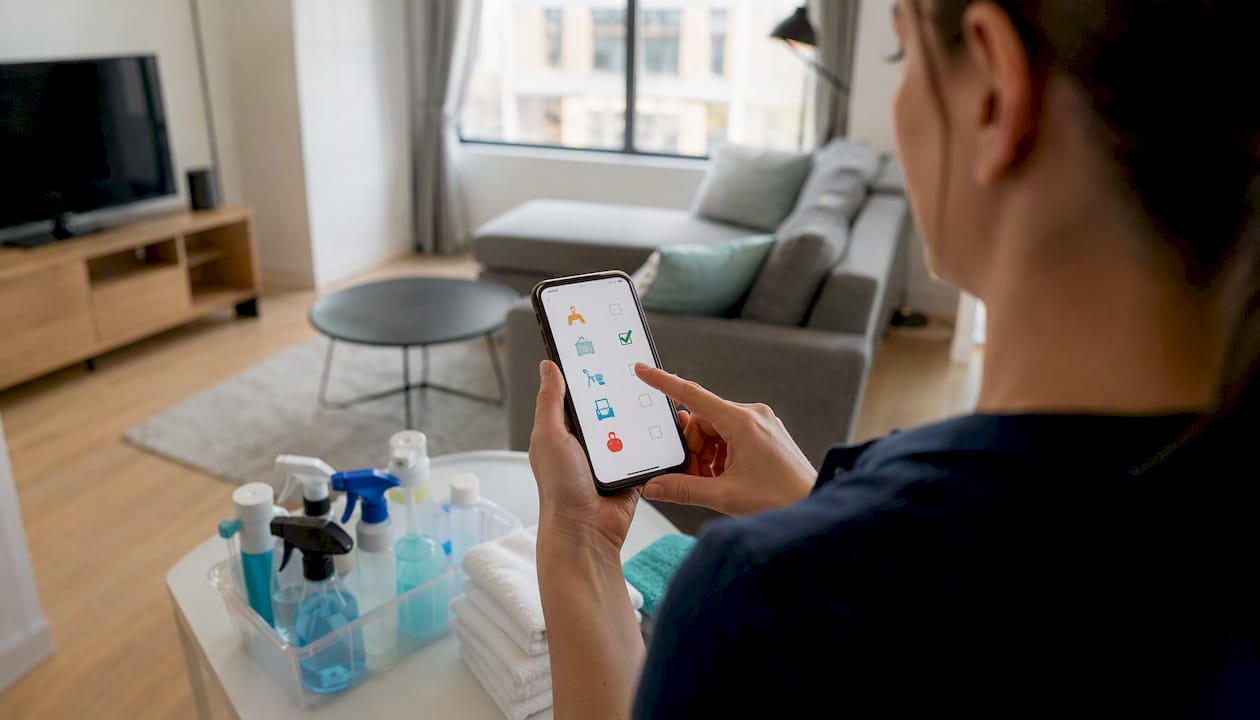
Cleaning pictograms are standardised icons that show, at a glance, the task to carry out: change the linen, empty the bins, disinfect the bathrooms, restock consumables. For turnover teams in short-term rentals, these cleaning symbols replace lengthy text instructions with a binary visual signal that is immediately actionable. The recommended action to take today: import a set of 8 essential icons into your mobile checklist and stick PVC stickers at the key locations in the property.
- Change sheets and bed linen
- Empty the bins
- Vacuum and mop the floors
- Clean and disinfect the bathrooms
- Wipe down the worktops
- Restock consumables (toilet paper, soap)
- Check the appliances
- Take proof photos
Pro tip: Start with a two-week pilot across 3 properties. Measure the average final inspection time before and after introducing the cleaning icons. That gap gives you a concrete argument for bringing the rest of the team on board.
Key takeaways
Standardised cleaning pictograms, combined with a mobile checklist and photo proof, are the most direct lever for reducing turnover errors and speeding up final inspections in short-term rentals.
| Point | Details |
|---|---|
| 8 priority icons | Linen, bins, floors, bathrooms, worktops, consumables, appliances, proof photos. |
| Final inspection: 10-20 minutes | A short visual checklist (25-45 points) makes the inspection repeatable and keeps it on time. |
| Physical + digital placement | Sticker on the surface AND icon in the mobile checklist: both together maximise adoption. |
| Timestamped photo proof | 3-6 photos per turnover, same angles each time, EXIF metadata preserved to protect the host in disputes. |
| Cleanclac | Lets you import SVG icons, require a photo per task, and access the timestamped history by booking. |
Contents
- Why do pictograms actually speed up team work?
- Which pictograms should you roll out first?
- How to design pictograms that are readable on a tablet and on a sticker
- Where to place pictograms so they actually get used
- How to integrate pictograms into your mobile workflow
- What cleaning frequency to assign to each area of the property
- Which templates and files to download to get started quickly
- How to manage team adoption
- What hands-on experience really teaches
- Cleanclac speeds up your pictogram rollout
- Useful resources
- Sources
- Frequently asked questions
Why do pictograms actually speed up team work?
The short answer: because they eliminate interpretation. A cleaner who reads "clean the bathroom" may forget the toilet seat. A cleaner who sees the disinfection icon on the bathroom door and then finds it as a checkable item in their mobile checklist knows exactly what is expected, without having to ask.
Industry professionals confirm that pictograms and visual aids must be visible, understandable at a glance and linked to the work tool (tablet, paper checklist, app) to be used correctly. In other words, a pictogram stuck on the fridge but absent from the mobile checklist produces only a partial effect.
Three benefits emerge from hands-on experience:
- Time saved on the final inspection. An efficient final inspection takes a reasonable amount of time depending on the size of the property, provided the checklist is short and visual. Without visual cues, the inspection drifts to 30 or 40 minutes.
- Fewer errors on sensitive tasks. The most common omissions (restocking toilet paper, disinfecting the shower, checking the dishwasher) involve tasks the eye does not naturally catch. A cleaning icon placed in the right spot acts as a physical reminder.
- Structured proof in disputes. Professional property managers use visual checklists and systematic proof photos to standardise quality and reduce guest disputes.
AI-powered visual auditing can compare photos taken by cleaners against a reference standard and generate a similarity score (for example a 95% threshold) to approve or block a check-in, while timestamping the proof. For managers handling more than 50 apartments, this automation frees up significant coordination time.
Which pictograms should you roll out first?
An effective turnover checklist runs to 25-45 points in a binary OK / Needs correcting format. Here are the 8 cleaning icons to prioritise, with their operational settings:
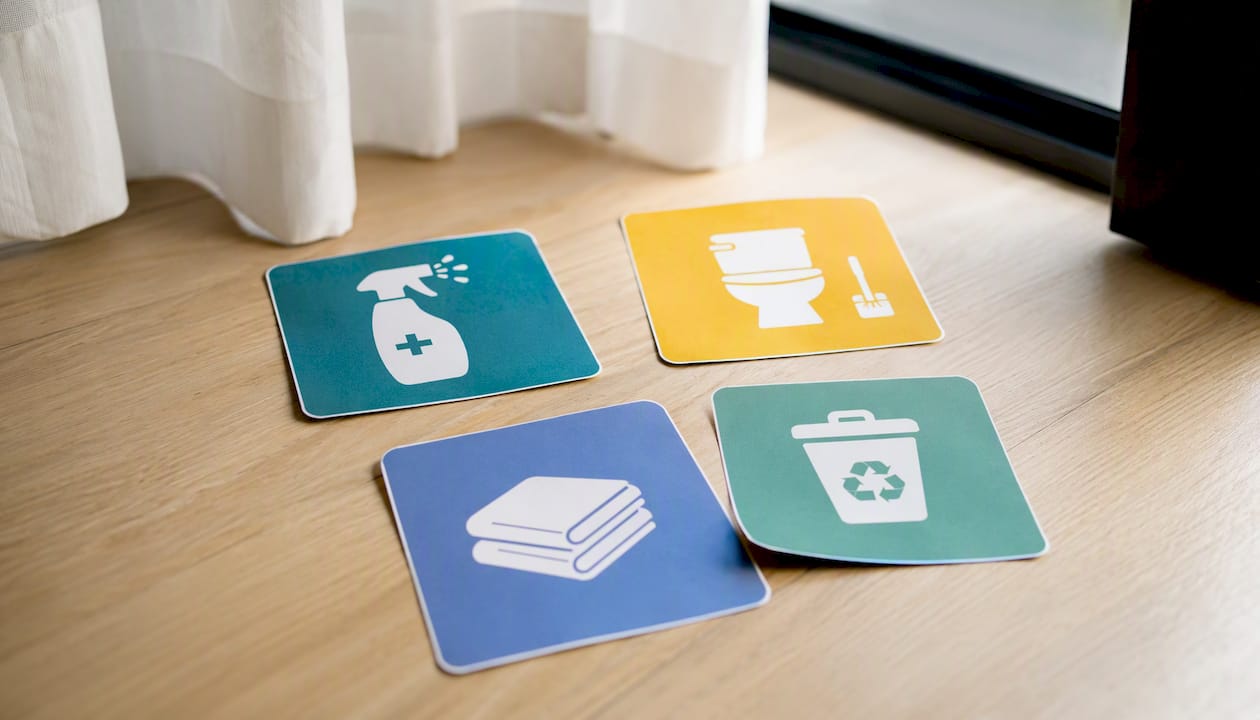
For each entry, the recommended format pairs the icon with a short label, a colour code, and a clear indication of whether a photo is required. Three to six photos per turnover is the recommended standard, taken from the same angles each visit to allow reliable comparison.
How to design pictograms that are readable on a tablet and on a sticker
Readability is not a question of graphic style. It is a question of physical constraints. A sticker on the bin room door must remain readable at 1.5 metres, in variable lighting. An icon in a mobile app must be recognisable at 48 pixels.
Practical rules to follow:
- Minimum size: 50 mm for PVC stickers, 48 px for mobile display.
- Contrast: meet WCAG thresholds (contrast ratio of at least 4.5:1 for associated text).
- Operational colour code: green = verified, orange = attention needed, red = corrective action required. Reserve a distinct colour (for example blue) for disinfection tasks, which are separate from basic cleaning.
- File formats: vector SVG for stickers and app integration, PNG 300 dpi for paper printing. Always prepare a monochrome version for low-light environments.
Pro tip: Never use a pictogram on its own. Always pair the icon with a short label and, where possible, a thumbnail photo showing the expected result. An ambiguous symbol without a visual reference generates more errors than a written instruction.
Where to place pictograms so they actually get used
Placement determines use. A pictogram visible at the exact spot where the task is carried out reduces the risk of omission far more effectively than a general poster in the hallway.
On site, priority locations:
- Sticker on the fridge (restocking, checking)
- Sticker on the dishwasher (checking, emptying)
- Sticker on the cleaning products cupboard (dosing protocol)
- Sticker on the bin room door (sorting, frequency)
- Wall poster in the trolley storage area
- Label on the cleaning trolley itself
On digital tools:
- Icons integrated into the mobile checklist, linked to each task
- Inspection thumbnails in the PMS, with a "take photo" button attached to the relevant pictogram
- Reference thumbnails accessible from the cleaning history
A standardised digital welcome guide can complement this setup on the guest side, reducing comfort-related call-outs and incoming messages. The effect is noticeable from a portfolio of around 5 managed properties. To go further on structuring the guide, the Airbnb checkout checklist from Mon Livret d'Accueil offers a practical framework to pair with your pictograms.
How to integrate pictograms into your mobile workflow
The recommended workflow follows a sequential logic: pictogram visible, checkbox, photo required if the task is critical, timestamp and cleaner sign-off, sync to the PMS, notification to the manager if an issue is detected.
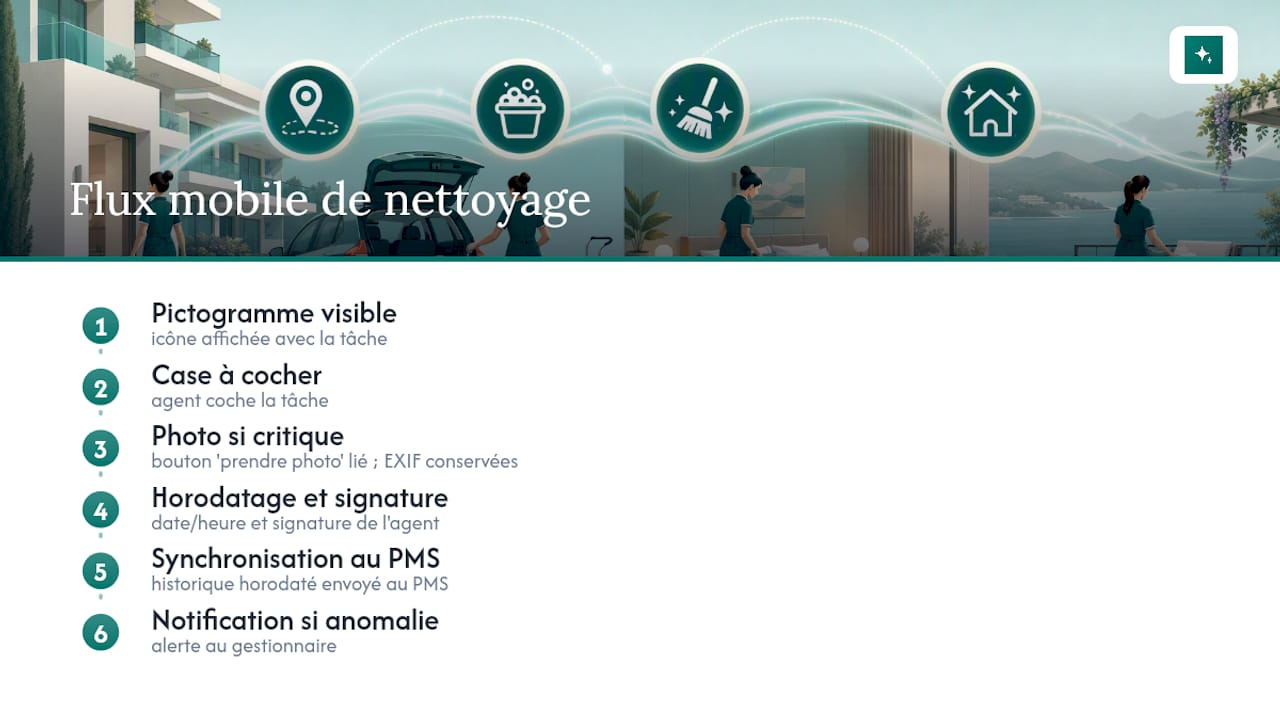
The cleaner receives their checklist on a smartphone. Each task displays its icon and, for critical items, a "take photo" button linked directly to that line. The manager and the owner then access the timestamped history from their dashboard, without any message exchange.
Pro tip: For proof photos, keep the EXIF metadata (date, time, GPS coordinates if enabled). In a dispute, that data is very difficult to challenge. Cleanclac archives this metadata automatically with each cleaning report.
For teams managing a high volume of properties, AI-powered visual auditing can automate the photo-to-standard comparison and generate a "Ready for check-in" or "Correction required" label without systematic human intervention. The timestamped photo proof remains the central element of this setup, whatever level of automation you choose.
What cleaning frequency to assign to each area of the property
Professional cleaning plans consistently distinguish between four frequencies. Coding them in the checklist with different-coloured pictograms (for example orange for weekly, grey for monthly) lets the cleaner know immediately whether a task falls to them on that particular visit.
Pro tip: Assign each frequency to a role: the cleaner covers after-every-service and daily tasks, a maintenance person handles weekly tasks, and an external contractor manages monthly ones. Code these roles in your PMS to avoid duplicates and omissions.
Which templates and files to download to get started quickly
Three pack levels cover most needs:
- Minimal pack (8 icons): SVG + PNG 300 dpi, English labels, ready to import into a mobile checklist or to print as an A6 sticker.
- Standard pack (16 icons + 3 colours): adds frequency variants (daily, weekly, monthly), the green/orange/red colour code, and a printable A4 PDF version.
- Pro pack: full vector icons, monochrome variants, print-ready files for PVC stickers, CSV importable into Cleanclac or any other PMS.
To customise: edit the labels in your SVG editor (Inkscape, Adobe Illustrator or Figma), add your reference photos in the designated fields, and adjust the colour code to match your welcome guide. The practical guides from Cleanclac walk through the import steps for the mobile checklist.
Pro tip: Print the minimal pack on laminated paper for the first few weeks. This lets the team get familiar with the icons before moving to vector versions in the app, without letting a technical issue block the rollout.
How to manage team adoption
A successful rollout follows four steps:
- Pilot (2 weeks, 3 properties): hand out the printed minimal pack, apply the stickers, activate the mobile checklist. Note the final inspection time and the number of errors reported.
- Short training session (1 hour): present each icon with its reference photo. A 15-second micro-video per critical task is enough to anchor the visual associations.
- Feedback collection (30 days): ask each cleaner to flag any icons they find ambiguous or poorly placed. Two or three responses are usually enough to identify the priority adjustments.
- Iteration: update the icons or their locations, then measure the KPIs again.
Indicators to track: final inspection time, error rate reported, photo compliance rate (proportion of critical tasks with a photo attached), and changes in guest cleanliness ratings.
Pro tip: Use the timestamped photo history to show the team the concrete improvement in quality week by week. It replaces subjective discussions with visual facts, and motivates far better than a verbal reminder.
What hands-on experience really teaches
Visual standardisation increases checklist usage, but only when pictograms are anchored in both the physical space and the digital tool. The most common mistake: icons that are too stylised, with no associated reference photo, which cleaners no longer recognise after two weeks. The most effective shortcut is still the printed pack for the first few weeks, before moving to vector versions in the app. Visual standardisation combined with reference photos increases inspection repeatability, especially when delegating to an external team or occasional cleaners.
Another point that is often underestimated: resistance to change rarely comes from rejecting the pictograms themselves. It comes from the feeling that the new system adds work. Showing the team in the very first week that the visual checklist reduces final inspection time is generally enough to overcome that resistance.
Cleanclac speeds up your pictogram rollout
Moving from theory to the field takes time when every property has its own process. Cleanclac removes that friction: import your SVG icons directly into the mobile checklist, require a photo for critical tasks, and every cleaning report is automatically timestamped and accessible to the owner from their dashboard. Assignment follows the Airbnb or Booking.com reservation calendar without manual input.

The concrete result: fewer back-and-forth messages between manager and cleaner, structured proof for every turnover, and a history you can consult in the event of a dispute. For property managers handling several listings, the Cleanclac cleaning management app offers a free trial. You can also check the 2026 cleaning software comparison to find the solution that fits your portfolio size.
Useful resources
- Cleaning and disinfection plan: best practices (JDC SA): reference for zone frequencies and pictogram display rules.
- Airbnb cleaning quality checklist (Alicante Conciergerie): a structured final inspection template with recommended duration and photo count.
- Airbnb cleaning checklist: complete guide (Welkomz): visual templates and proof photo practices for property managers.
- AI visual auditing for short-term rental cleaning (HTCN): automating photo validation with a similarity score.
- Cleanclac cleaning tips and guides: practical resources for checklists, restocking and final inspections tailored to holiday rentals.
- Automating guest welcome (Mon Livret d'Accueil): a complementary guide for pairing pictograms and a digital welcome guide in the check-in workflow.
Sources
- Cleaning & disinfection plan: best practices | JDC SA
- Airbnb cleaning quality checklist Alicante: structuring a simple final inspection - Alicante Conciergerie
- Airbnb cleaning checklist: complete guide
- How a concierge service boosted its profitability with a digital welcome guide | WonderGuest Blog
Frequently asked questions
How many pictograms do you need for a turnover checklist?
An icon pack covers the critical tasks of a standard turnover. For more complex properties or multi-person teams, a fuller pack with colour coding is recommended.
Which file format should you use for pictograms?
SVG for integration into mobile apps and PVC stickers, PNG 300 dpi for paper printing. Always prepare a monochrome version for low-light environments.
Do pictograms replace written instructions?
No: they complement them. Each icon should be paired with a short label and, for critical tasks, a reference photo showing the expected result. A pictogram alone remains ambiguous without that context.
How do you measure the effectiveness of pictograms after rollout?
Track three indicators: final inspection time (target: 10-20 minutes), the error rate reported per turnover, and the photo compliance rate for critical tasks. A two-week pilot across 3 properties gives you comparable data.
Does Cleanclac support custom pictograms?
Yes. Cleanclac accepts SVG icon imports into the mobile checklist, with the option to require a photo per task and to access the timestamped history by booking from the manager dashboard.


