Automate Airbnb Cleaning with the API: Technical Guide
Learn how to automate Airbnb cleaning via the API: get access, capture booking events, schedule tasks, and trigger cleaning missions automatically.

Jonathan Lalinec
Yes, you can automate cleaning via the Airbnb API, either by capturing booking webhooks directly or by connecting a PMS or channel manager already authorised by the platform. The fastest path is to obtain an OAuth connection through an approved partner, capture the confirmed-booking event, apply your scheduling business rules, then automatically generate and notify a cleaning mission. One important caveat: iCal remains a fragile fallback, and any integration must comply with Airbnb's API terms of service.
In brief:
- Most operators use an Airbnb-approved PMS or channel manager to access the API via OAuth, because direct access is rare and reserved for strategic partners.
- Reliable booking synchronisation depends on capturing events in real time via webhooks, with a queue-based architecture and strict idempotency handling to prevent duplicates.
- Automating cleaning requires precise time-window configuration, cancellation handling, and mission prioritisation, especially for back-to-back turnovers or last-minute changes.
- Multi-channel synchronisation calls for a centralised PMS that controls calendar uniqueness, removes redundant iCal feeds, and sets up alerts to detect any discrepancy quickly.
- Data flow security must meet industry standards, including HMAC validation, OAuth token encryption, and GDPR compliance, or risk suspension and violations.
Table of contents
- How do you get access to the Airbnb API for cleaning?
- What technical architecture captures booking events reliably?
- How do you turn a booking into a reliable cleaning mission?
- PMS, channel manager, and iCal: how to orchestrate multiple channels
- How do you organise cleaners on the ground?
- Security and compliance: what Airbnb actually requires
- What to do when missions duplicate or disappear
- How CleanClac orchestrates cleaning automation in practice
- What real-world implementation reveals
- How to get started with CleanClac today
- Sources
- Frequently asked questions
How do you get access to the Airbnb API for cleaning?
Airbnb does not distribute its API as an open-access product. Two routes exist, and they are not aimed at the same type of user.
The first is the Homes API, reserved for operators who can demonstrate a volume or business model that Airbnb considers strategic: large PMS providers, channel managers, multi-property management platforms. Onboarding goes through a selective partner programme, documented on the official developer platform, which requires a technical application, a working demo account, and often a non-disclosure agreement before any approval. The second route, far more accessible in practice, is to go through an already-approved PMS or channel manager. That intermediary has already negotiated its own direct access and opens a connection to you via OAuth, without requiring you to submit your own application.
This is in fact how the vast majority of hosts and property managers operate. Direct access is rare, and Airbnb's partner programme remains deliberately restrictive, which pushes almost everyone in the market to go through an already-certified PMS rather than applying individually.
In concrete terms, the criteria Airbnb consistently looks for before approving a partner include:
- A documented security architecture, with encryption for data at rest and in transit.
- A working demo account, allowing the Airbnb team to test the end-to-end flow before going live.
- A signed non-disclosure agreement, governing the use of booking and guest data.
- A contractual commitment on response times and service availability, close to a standard service-level agreement.
- Strict adherence to the API's rate limits, under penalty of suspension.
The OAuth process, in this context, works as a controlled delegation. The host logs into the PMS interface, authorises it to access their Airbnb account, and an access token is issued. Technically, that token carries rights locked to specific scopes (reading bookings, sending messages, and so on) and must be renewed periodically. The PMS then acts as a trusted intermediary, accountable to Airbnb for compliance with the API terms of service, including call quotas and the obligation not to duplicate data beyond what is necessary.
One last option, often mentioned as a default, is iCal. It requires no approval or partner programme, but it offers no webhooks and no write access: only periodic calendar reads. We will see later why this technical limitation changes everything for a cleaning use case.
What technical architecture captures booking events reliably?
Reliable cleaning automation depends on capturing three categories of events as a priority: confirmed booking, date change, and cancellation. Each one triggers a different action in your scheduling system, and missing just one is enough to send a cleaner out for nothing, or worse, leave a property that was never cleaned.
The standard technical pipeline follows a sequence that is fairly common in event-driven API design:
- Airbnb (or your PMS) sends an HTTP POST request to your webhook endpoint as soon as an event occurs.
- Your server validates the payload signature, usually via HMAC, to confirm the request comes from a legitimate source.
- The validated event is pushed into a persistent queue rather than processed synchronously.
- A worker consumes the queue, applies the business rules, and creates (or updates) the corresponding cleaning mission.
- A notification goes out to the assigned cleaner, by push notification or SMS depending on your stack.
This queue-based architecture is not a perfectionist engineer's luxury. Without it, a spike of bookings on a Sunday evening can overwhelm your endpoint and drop events, which translates directly into properties that are not cleaned on Monday morning. Airbnb's official documentation explicitly recommends processing webhooks asynchronously rather than blocking the incoming connection for the duration of all business logic.
Idempotency deserves particular attention. Each event carries a unique booking identifier. Your worker must check, before creating a mission, that no task already exists for that exact identifier. Without this safeguard, a simple network retry, which is common on the unstable mobile connections cleaners use, duplicates the mission and creates confusion in the schedule. Best practice is to maintain a mapping table between booking identifier and mission identifier, with a uniqueness constraint at the database level rather than a simple application-level check, which is easier to bypass under parallel processing.
The rate limits imposed by Airbnb also require a fallback strategy. Exponential backoff, which progressively increases the delay between attempts after a rejection, prevents you from being temporarily banned for excessive requests. Combine this with a bounded retry system (three to five attempts maximum) rather than an infinite loop that would mask a structural problem.
Pro tip: never store only the "processed" or "unprocessed" status of an event. Keep the raw payload received, with a timestamp, in a separate archive table. The day a cleaner complains about a phantom or missing mission, you can replay the exact history rather than guessing what happened.
On the payload side, certain fields are worth extracting systematically on receipt, because they feed directly into your scheduling business rules: check-in date and time, checkout date and time, number of guests, and any notes the guest has left about their actual arrival time. That last field is often underused. A guest who flags a late arrival at 10 pm can shift the available cleaning window the following morning, especially in a back-to-back turnover situation.
How do you turn a booking into a reliable cleaning mission?
Converting a booking event into an actionable cleaning task depends on a set of configurable rules, not a fixed logic. Two identical-sized properties can require different cleaning durations depending on the type of stay that just ended.
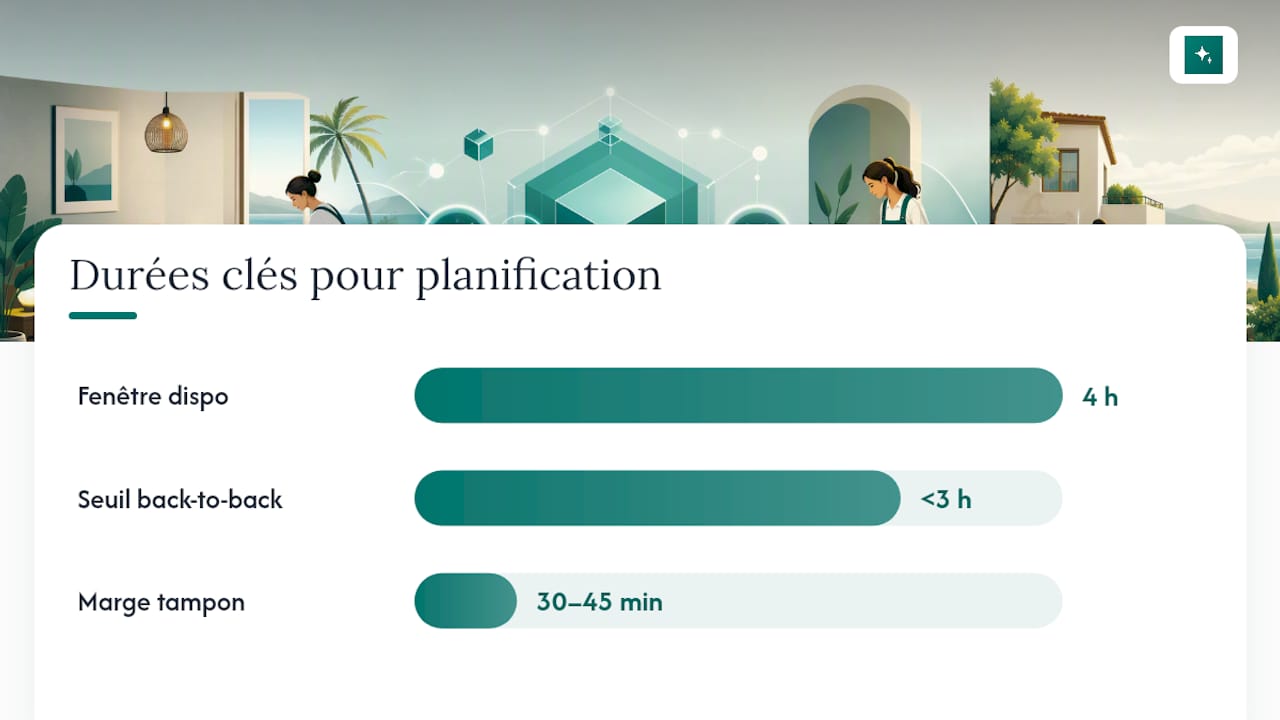
The first dimension to configure is time windows. A checkout at 11 am followed by a check-in at 3 pm the same day leaves four hours, which seems generous but shrinks quickly once you subtract travel time for the cleaner and a safety buffer for the unexpected. Most teams apply a buffer of thirty to forty-five minutes before the next check-in to absorb a slight delay without putting the host in breach with the incoming guest. The duration itself should vary by turnover type: a standard clean between two short stays does not take the same time as a deep clean after a stay of a week or more, with a full linen changeover and a broader equipment check.
Changes and cancellations pose a different problem, often underestimated. A guest who cancels three days before arrival frees up an already-scheduled mission. Without automation, the cleaner sometimes shows up at a property that was never occupied, wasting a scarce human resource. A good rule is to cancel the associated mission automatically as soon as the cancellation event is received, with an immediate notification to the cleaner concerned, and to reschedule automatically if a new booking fills the newly freed slot.
The parameters that determine the exact nature of the mission typically include:
- The level of cleaning required (standard or deep, depending on the length of the previous stay).
- The linen to change, based on the number of beds used.
- The mandatory photo checklist before the mission can be marked as complete.
- A random or systematic quality check, depending on how critical the property is (for example, newly listed properties under closer scrutiny).
Prioritisation between competing missions generally follows a simple logic, but one that needs to be written explicitly into the code rather than left to the cleaner's judgement in the field. A back-to-back turnover, where checkout and the next check-in fall on the same day with less than three hours between them, should automatically jump to the top of the queue ahead of a clean for a property that sits vacant for several days after. Similarly, a last-minute booking change with an earlier arrival deserves a distinct urgent alert rather than a routine notification, so the cleaner sees it immediately rather than discovering it at the end of the day.
PMS, channel manager, and iCal: how to orchestrate multiple channels
As soon as a property is listed on several platforms, the question is no longer just how to capture Airbnb events, but how to guarantee a single source of truth for the cleaning schedule. This is where a PMS or channel manager genuinely changes operational reality.
The PMS acts as a centralised OAuth bridge: it holds the authorisation with Airbnb, Booking.com, Vrbo, and other platforms, and redistributes consolidated events to your cleaning system via a single API. This centralisation avoids managing as many separate integrations as you have active booking channels, which quickly becomes unmanageable beyond two or three.
iCal, by comparison, remains a supplementary option rather than a serious automation foundation. The official API and its webhooks significantly reduce this risk compared to calendar-based synchronisation, precisely because they push information in real time rather than waiting for the next polling cycle.
Some teams try stacking multiple redundant iCal feeds to "secure" synchronisation. In practice, this produces the opposite effect: more feeds means more potentially out-of-sync sources, and therefore more conflicts to resolve manually. Best practice is to remove redundant iCal feeds as soon as an API or PMS integration is in place, keeping iCal only as a last resort for a channel that offers no other option.
To maintain a single source of truth in a multi-channel environment, a few operational principles consistently appear among managers handling several dozen properties:
- Designate the PMS as the single calendar reference point, with all other platforms acting only as synchronised mirrors.
- Set up an automatic alert whenever a gap of more than a few hours appears between two calendars for the same property.
- Log every synchronisation with a timestamp, so you can quickly trace the origin of any conflict.
- Prepare a documented manual fallback procedure for the rare cases when the platform API goes down.
Concrete implementation examples, particularly via official API connections on the integrator side, show that this type of architecture virtually eliminates double bookings once real-time synchronisation is in place, while also centralising guest messaging in the process.
How do you organise cleaners on the ground?
A mission created automatically is worthless if it does not reach the right cleaner, at the right time, with the right supplies available. API automation is only half the problem; the other half plays out in the field.
Duration estimates for cleaning tasks become far more accurate when they draw on historical data rather than a single flat estimate. A twenty-five-square-metre studio and a three-bedroom apartment obviously do not take the same time, but even two properties of comparable size can diverge if one consistently hosts families with children and the other solo business travellers. Progressively adjusting the estimated duration based on the actual history of each property refines scheduling far more than a generic rule applied uniformly.
Here is a straightforward method for structuring mission assignment:
- Filter available cleaners by their geographic coverage zone, to avoid unnecessary travel.
- Cross-reference that list against the skills required (standard clean, deep clean, complex linen management).
- Check the workload already scheduled for the day before assigning an additional mission.
- Assign automatically if only one cleaner matches the criteria, or offer a choice to managers if several qualify.
- Build an automatic replacement workflow for last-minute unavailability, with cascading notifications to backup cleaners.
Pro tip: never leave a single cleaner as the sole person responsible for a property without an identified backup. One personal emergency, without a prepared replacement, turns a missed mission into a crisis that reaches the guest.
Stock and supply management deserves the same level of automation as the schedule itself. An automatic alert, triggered when clean linen or cleaning product stock drops below a critical level, prevents the dry run discovered at the worst moment, just before a run of back-to-back bookings. Some teams couple this tracking to a semi-automatic reorder as soon as the threshold is reached.

Finally, quality indicators must remain measurable rather than impressionistic. Mandatory before-and-after photos, systematic second-look validation on a sample of missions, and tracking a non-conformity rate by cleaner allow you to catch a recurring problem quickly rather than discovering it via a negative guest review. In the field, photo validation significantly reduces post-stay disputes, a benefit that goes well beyond simple internal quality control.
Security and compliance: what Airbnb actually requires
Automating cleaning via API touches sensitive booking data: dates of presence, guest identities, sometimes phone numbers. This demands a level of technical rigour that goes beyond simply making the webhook work.
OAuth token storage must follow standard application security practices: encryption at rest, regular rotation, and immediate revocation when access is no longer needed, for example after ending a contract with a cleaning provider. A token sitting in plain text in a configuration file remains one of the most common vulnerabilities found in third-party integration audits.
The API terms of service set concrete obligations that many teams discover too late: maintaining a working demo account for Airbnb audits, strictly respecting rate limits, and above all the explicit acknowledgement that Airbnb can suspend access at any time for non-compliance. This is not a theoretical clause. Poorly designed integrations that send unnecessary calls beyond their quota do get cut off.
On pure web security, recommendations align with industry standards:
- Validate the HMAC signature of every webhook received, without exception, even in test environments.
- Implement anti-replay protection, to prevent an intercepted event from being replayed fraudulently.
- Follow the OWASP Top Ten principles on input validation and authentication management for exposed endpoints.
- Limit the attack surface by exposing only the endpoints strictly necessary for event processing.
Watch out: an integration that skips HMAC validation on its webhooks is open to injected fake events, capable of generating phantom missions or hiding real cancellations. This is not a secondary technical detail. It is the most commonly exploited entry point in this type of architecture.
On the GDPR side, data minimisation remains the guiding principle: retain only the fields strictly necessary for cleaning scheduling, with a defined and documented retention period, rather than archiving the full payload received indefinitely out of convenience.
What to do when missions duplicate or disappear
Three symptoms come up most often in production integrations: duplicated missions for the same booking, webhooks that never arrive, and calendar discrepancies when iCal remains active alongside the API.
When these incidents occur, the diagnostic approach always follows the same logic:
- Check the timestamped webhook reception logs to verify whether the event actually arrived server-side.
- Verify whether a corresponding queue entry exists, to isolate a reception problem from a processing problem.
- Replay the archived event from your raw table rather than manually recreating the mission, to keep a consistent audit trail.
- If the webhook never arrived, check the OAuth connection status and any rate-limit breach alerts.
A persistent queue combined with a retry logic that enforces strict idempotency absorbs the majority of these incidents before they become visible to a manager. The escalation procedure should remain simple: an incident unresolved within fifteen minutes shifts to a manual schedule check, with a post-incident checklist that documents the root cause to prevent recurrence. Active monitoring of the hourly volume of webhooks received, compared against a historical baseline, often detects an outage before a cleaner arrives at a locked door.
How CleanClac orchestrates cleaning automation in practice
The typical flow implemented by CleanClac starts exactly from the architecture described above: booking received, scheduling rules applied, mission automatically created, then direct notification to the assigned cleaner. The difference lies in field execution rather than technical theory.
Each cleaner has individual mobile access, without going through a shared spreadsheet or scattered instant messaging. The mission appears directly on their phone, with the address, the deadline, and the expected checklist. Once the clean is done, the cleaner documents their visit with photos directly in the app, which feeds a report the manager can consult in real time rather than receiving a delayed update by message.
The concrete features that structure this flow include:
- Automatic or manual mission assignment based on cleaner availability and coverage zone.
- Stock and supply tracking, with replenishment alerts before running out.
- Cleaning reports with photos and videos, viewable in real time by the manager.
- Performance tracking by cleaner, useful for quickly identifying a recurring quality issue.
- The ability to find a local cleaning provider in case of a last-minute emergency, via the cleaner directory.
On the integration side, CleanClac works both connected to an existing PMS, consuming its consolidated events, and in standalone mode for managers who handle their Airbnb listings directly. This flexibility avoids forcing a complete ecosystem change on a property manager who has already invested in a channel manager.
What real-world implementation reveals
Given everything above, one practical question dominates all others: where do you start without drowning in technical complexity?
The approach that works best is incremental. Pilot the automation on one or two properties first, syncing only calendars and basic mission creation, before adding fine-grained prioritisation rules or supply management. Add webhook monitoring during this pilot phase, not after. It is precisely when volume is low that incidents go unnoticed and create bad diagnostic habits.
The real trade-off to resolve early is speed of implementation versus technical robustness. Quickly coding a synchronous handler without a queue works for testing a concept on five properties. It becomes risky at fifty, where a traffic spike on a Friday evening is enough to drop critical events. The investments that pay off most are not the most visible ones: time spent testing edge cases around late cancellations, training cleaners to use the mobile app, and setting up monitoring alerts before the first real incident. Test on a small scope before rolling out widely. It is the only way to find your blind spots before they cost you an unprepared stay.
, Jonathan
How to get started with CleanClac today
Building this architecture in-house, webhooks, queue, business rules, mobile app for cleaners, represents several months of development before the first reliably automated mission. A ready-to-use solution exists, designed specifically for short-term rental management.

The app covers the entire cycle described in this article: automatic or manual mission assignment from bookings across multiple platforms, individual mobile access for each cleaner, real-time property status tracking, photo and video reports, and supply stock management with replenishment alerts. It integrates with the main PMS platforms for operations that are already equipped, but also works standalone for managers who prefer to handle their listings directly without changing their existing ecosystem.
Building this technical chain yourself makes sense for a property management company handling several hundred properties with a dedicated development team. For the majority of managers and small concierge services, the speed of deploying an existing solution far outweighs the total control of an in-house build, especially when webhook maintenance and business rule updates then fall back on the same team. You can test the CleanClac app on your first properties, or browse the cleaner directory for providers near you if you need a cleaning solution on the ground without waiting for the full automation setup.
Sources
To go deeper on the technical implementation, the Airbnb developer documentation remains the reference for endpoints, the API explorer, and webhook schemas. The precise contractual obligations are set out in the API terms of service, which should be read before going live. For securing exposed endpoints, OWASP covers input validation and authentication management. And if you are comparing cleaning management solutions on the market, our Airbnb cleaning software comparison details the selection criteria by portfolio size.
Frequently asked questions
Is cleaning between two Airbnb stays mandatory?
Airbnb does not contractually require professional cleaning between every stay, but guest expectations and the review system make it indispensable in practice. The platform also offers a directory of recommended providers for hosts who do not handle this cleaning themselves.
How much does an hour of cleaning cost for an Airbnb property?
Rates vary widely depending on the region, the size of the property, and the level of service required, from a standard clean to a deep clean with full linen changeover. Our analysis of Airbnb cleaning software pricing covers the tool-side pricing models, which complement the cost of labour itself.
How do I set up the cleaning fee on an Airbnb listing?
Cleaning fees are configured directly in the pricing options of the listing, where the host can add a fixed amount charged to the guest on top of the nightly rate. This setting is separate from the technical automation described in this article, which concerns scheduling the cleaning mission itself, not billing for it.
How do I automate cleaning without building my own API integration?
The fastest route is to use a dedicated app like CleanClac, which connects to Airbnb bookings and automatically generates cleaning missions without requiring any development skills on the manager's side. This is the right option for any organisation that does not have an in-house technical team dedicated to this kind of integration.
What is the difference between the Airbnb API and iCal for cleaning?
The API works via real-time webhooks, which instantly trigger the creation of a mission as soon as a booking is confirmed. iCal relies on periodic calendar polling, with a lag that can reach one hour, increasing the risk of double bookings or missed cleaning missions.


