How to Prevent Cleaner No-Shows in Short-Term Rentals
Learn how to prevent cleaner no-shows in your short-term rentals. Apply proven systems with backup pools, auto-confirmations, and fast payment to protect every turnover.

Jonathan Lalinec
To prevent cleaner no-shows, combine a clear service agreement, automated confirmations, an active backup pool, and fast payment. The three things to do first: activate a mandatory confirmation 24 hours before every clean, prepare at least two backup cleaners per property, and set up payment within 24 to 48 hours. Applied together, these three levers significantly reduce the risk of a last-minute absence.
In brief:
- Setting up an automated confirmation 24 hours before each clean and paying within 48 hours significantly reduces no-shows and their operational impact.
- A written service agreement that sets strict time windows, requires timestamped evidence, and includes penalties reduces the frequency of unannounced absences and disputes.
- The majority of no-show incidents in the cleaning sector affect around 4% of daily jobs, which justifies building a pool of reliable backup cleaners.
- Automated tools covering confirmation, reminders, timestamped photo evidence, and failover let you handle unexpected situations without manual intervention.
- Using a platform like CleanClac centralises scheduling, automates replacements, and simplifies tracking to reduce incidents and improve reliability.
Table of contents
- What to do minute by minute when a cleaner does not show up
- How a service agreement reduces cleaner absences
- Which cleaning software features prevent no-shows
- CleanClac and a no-show: which operational workflow to follow
- What I wish I had known before building this system
- Automate your confirmations and replacements with CleanClac
- Sources
- Frequently asked questions
What to do minute by minute when a cleaner does not show up
A no-show does not wait. Every minute lost brings the next guest's arrival closer, and the margin for manoeuvre shrinks fast, which underlines the importance of a well-prepared Airbnb checkout checklist to keep turnovers on track. Here is the sequence to follow as soon as a scheduled clean has no start confirmation.
- 0 to 5 minutes: call the cleaner directly, do not rely on a text message. At the same time, check in your app that the task is properly assigned and that the access instructions are up to date.
- 5 to 15 minutes: if there is no answer, activate your priority backup. A guide on handling no-shows on turnover day recommends offering an emergency rate at this point rather than wasting time negotiating.
- 15 to 60 minutes: prepare guest communications if a delay looks likely, keeping a factual and reassuring tone, and get out the emergency kit: spare linen, basic supplies, and if your area allows it, an external cleaner.
A good guest message stays short and concrete: "We are adjusting the arrival time due to a logistical issue. Your room will be ready by 4:30 pm at the latest. Thank you for your patience." No lengthy apologies, no internal details.
The 90-minute rule applies here: if no confirmation arrives within that window, switching to the backup becomes automatic, not discretionary. This principle underlies the most effective emergency protocols observed in the industry.
Pro tip: always have a small gesture or token compensation ready for the affected guest. A quick goodwill offer costs far less than a one-star review.
An app that centralises assignment, confirmation history, and backup contact details turns this checklist into a reflex rather than an improvisation under pressure.
How a service agreement reduces cleaner absences
A written SLA between the property manager and the cleaner changes the nature of the relationship: it moves from an informal arrangement to a measurable commitment. According to STR Specialist, a detailed agreement that sets time windows, requires timestamped photos, and includes clear penalties significantly reduces disputes and repeat absences.
A solid SLA covers at minimum:
- a precise time window for each job, with a defined late tolerance agreed in advance;
- mandatory timestamped photos on arrival and at checkout, to settle any dispute;
- a clear escalation deadline, with the 90-minute rule often used as the benchmark;
- proportionate penalties for unannounced absences, and bonuses for consistent attendance.
The average daily absence rate in the cleaning sector is around 4%, close to US building maintenance industry data. At that frequency, a manager running fifteen properties should statistically expect one incident per month, which makes the SLA less optional than structural.
Pay policy matters just as much as the contract. Payment within 24 to 48 hours, combined with bonuses for high-demand days, builds loyalty among the best cleaners and encourages them to prioritise your jobs over those of a less responsive competitor.
Classify your properties across three tiers: Tier 1 for high-turnover, high-visibility rentals; Tier 2 for standard properties; Tier 3 for flexible units where a few hours' shift causes no problem. This hierarchy lets you redirect an urgent task to a Tier 3 property rather than overloading a cleaner already committed elsewhere, a healthier redistribution logic than spreading tasks evenly across the board.
A simple scorecard covering punctuality, completion rate, and quality score is enough to track each cleaner's reliability and decide who stays in the priority pool.
Which cleaning software features prevent no-shows
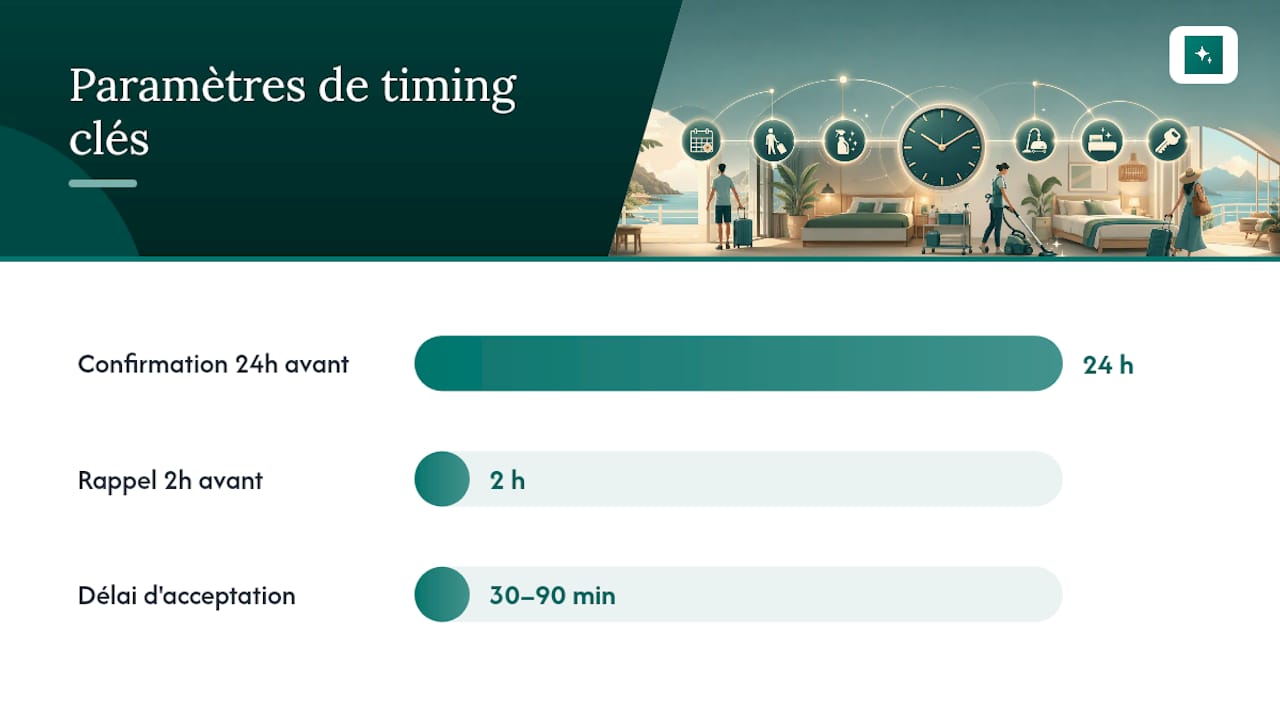
Automation does not replace the human relationship, but it eliminates the blind spots that cause most unexpected absences. Properly and other industry guides agree on one point: automated processes, covering confirmations, failover, and evidence, turn a fragile operation into a repeatable system.
Four settings deserve close attention in your app:
- an automated confirmation sent 24 hours before the job, followed by a reminder 2 hours before, with an acceptance window of 30 to 90 minutes depending on how busy the schedule is;
- an automatic failover that notifies the backup as soon as the deadline expires, without any manual intervention from the manager;
- timestamped, geotagged photo evidence at each stage, usable in case of a dispute or audit;
- real-time alerts on the dashboard, with a direct call button and one-click reassignment.
| Feature | Trigger | Main benefit |
|---|---|---|
| 24h confirmation | Automatic send the day before | Detects a problem before the day of the clean |
| 2h reminder | Automatic send on the day | Reduces the uncertainty window |
| Automatic failover | No response after 30 to 90 min | Activates the backup without delay |
| Timestamped photo evidence | On arrival and at checkout | Protects against disputes and supports quality tracking |
Group SMS notifications remain a false solution: they create latency, nobody feels responsible for replying first, and they leave no usable record. An individual notification with read receipt saves precious time at the moment when every minute counts.
CleanClac and a no-show: which operational workflow to follow
CleanClac brings these mechanisms together in a single interface, designed for managers juggling multiple properties and multiple cleaners. Scheduling syncs automatically with Airbnb, Booking, and Abritel reservations, and each cleaner has their own mobile access to confirm, document, and flag an issue without a superfluous phone call.
In practice, the workflow looks like this:
- the task is assigned automatically based on the booking calendar;
- the cleaner confirms from their smartphone, and a lack of response triggers an alert to the manager;
- timestamped photos uploaded at the end of the clean feed a report viewable in real time;
- per-cleaner performance tracking feeds a scorecard that makes rotation decisions straightforward.
If a local backup is unavailable, the cleaner search feature lets you quickly find an available cleaner in your area, rather than depending on a single contact.
Pro tip: log every no-show in the app's history, even those resolved quickly. That data is what justifies adjusting your bonus policy or your backup pool six months down the line.
What I wish I had known before building this system
Most managers discover the urgency of a SLA after their first costly incident, not before. The first month of implementation should focus on three priorities: activating automated confirmations, building a pool of at least two backup cleaners per property, and switching to fast payment. The most common mistakes I see: relying on group SMS with no traceability, paying cleaners at thirty days while assuming it has no effect on their loyalty, and leaving a backup pool that exists on paper but never actually receives a real job. A quick audit comes down to three questions: are your confirmations automated, have your backup cleaners worked in the last month, and are your payments going out within 48 hours?
, Jonathan
Automate your confirmations and replacements with CleanClac
CleanClac saves you the time you currently lose chasing each cleaner manually before a check-in. Unlike a contact list managed by hand or scattered SMS threads, the app centralises scheduling around your bookings, individual mobile access for each cleaner, and timestamped photo evidence, all in a single dashboard.

For a manager already tracking several properties, this shift makes a tangible difference day to day: fewer check-up calls, immediate visibility into who has confirmed and who has not responded, and a usable history for adjusting your pay policy. If you are still weighing up several solutions on the market, the CleanClac comparison against Properly, TIDY, and Turnify sets out the different approaches to replacement management. To get started, test automated clean scheduling on your current properties and measure the drop in unexpected incidents within the first month.
Sources
- How to Handle Cleaner No-Shows on Turnover Day | RapidEye
- Cleaner Agreements That Prevent No-Shows, Price Creep & Blame Games | STR Specialist
- Airbnb Cleaner No-Show: What to Do Right Now (and How to Prevent It) | Properly Blog
Frequently asked questions
What is the average no-show rate among cleaners?
The cleaning sector sees a daily absence rate of around 4%, which makes a backup pool essential as soon as you manage several properties.
How long should you wait before activating a backup?
Most protocols recommend calling within the first 5 minutes and activating a backup if no confirmation arrives within 90 minutes, a window that gives enough time to resolve a simple delay without jeopardising check-in.
Is a written SLA really necessary with independent cleaners?
Yes: an agreement that sets time windows, requires timestamped photos, and includes penalties and bonuses significantly reduces disputes, according to industry feedback.
Does fast payment actually reduce no-shows?
Operators who pay within 24 to 48 hours and add bonuses for peak days report better cleaner loyalty, a direct factor in reducing no-shows.
How does CleanClac help limit no-shows?
CleanClac automates confirmations, centralises timestamped photo evidence, and lets you search for a local cleaner in case of an unexpected absence, cutting the time between spotting a no-show and replacing the cleaner.


