How to Optimise Cleaner Routes and Cut Costs
Learn how to optimise your cleaners' routes to cut costs and save time. Discover a three-step method you can start applying today.

Jonathan Lalinec
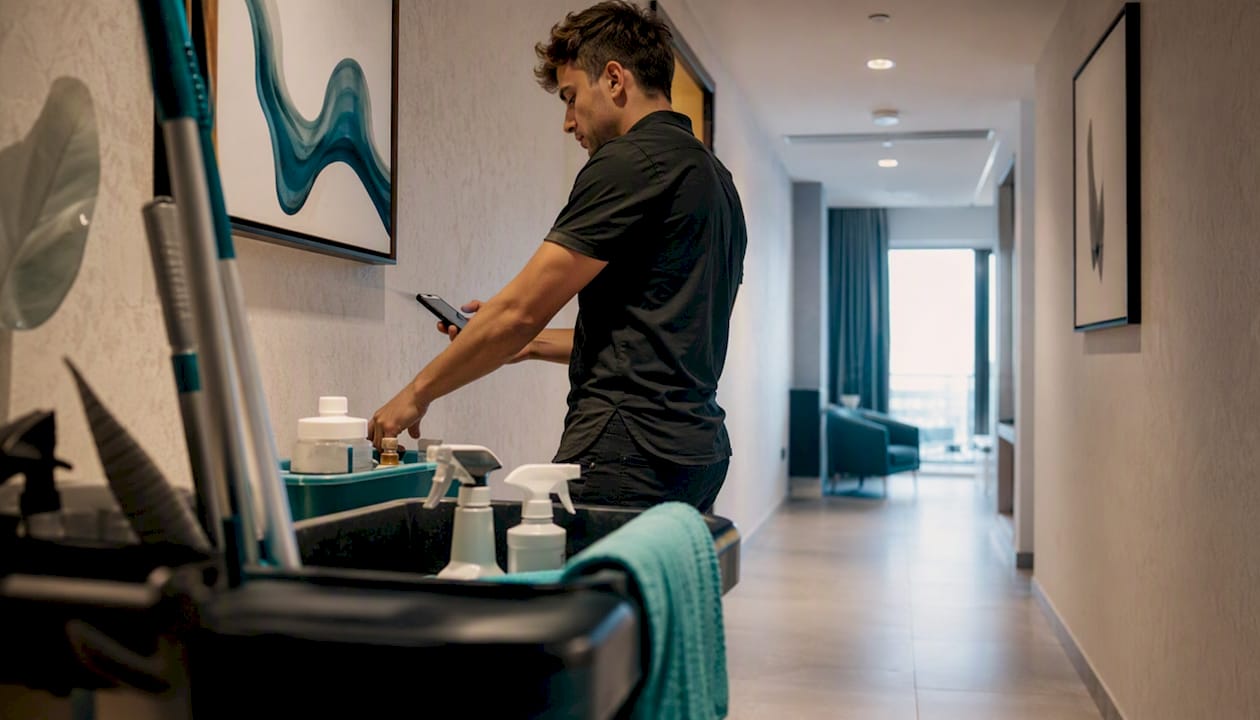
The fastest way to optimise your cleaners' routes is to group properties by geographic zone, sequence the stops according to client time windows, and then automate everything with software that recalculates in real time based on traffic and available skills. This three-step method, clustering, sequencing, automation, works just as well for a team of three cleaners as for a fleet of twenty.
Before you think about software at all, here is what a manager can do today:
- Map every active property on a map, whether paper or digital, to visualise where jobs are concentrated and which ones are isolated.
- Identify the time windows your clients or bookings impose: Airbnb check-in at 3 pm, a cleaning window between two stays.
- List the skills or equipment each property requires: pressure washing, specific products, coded access.
- Spot existing routes that send a cleaner across town twice in the same day.
Indicative estimate: according to one industry article, reorganising cleaning itineraries can reduce the distance travelled by 20 to 40 % and save between 1.5 and 3 hours per team per day. These are sector-wide ballpark figures, not a guarantee for your operation, but they give a sense of the potential before you invest in any tool.
Key takeaways
Optimising cleaning routes rests on three inseparable pillars: geographic clustering, strict adherence to time windows, and automated sequencing through purpose-built software.
| Point | Details |
|---|---|
| Map before you automate | Centralise addresses, time windows and skill requirements before changing any tool. |
| Cluster by actual traffic | Group properties into coherent zones based on real road networks, not straight-line distance. |
| Track seven key metrics | Monitor kilometres driven, driving hours, jobs per day and planning time every week. |
| Secure the legal framework | Verify that your routes respect the distinction between travel time and actual working time. |
| Pilot before you roll out | A two-to-four-week pilot with one team validates the tool before full deployment. Solutions like CleanClac make this straightforward via their mobile app. |
Table of contents
- Why optimising cleaning routes changes your margin
- How to structure a cleaning route step by step
- What software features you need to optimise routes
- Which metrics to track to measure the gains
- How to roll out optimisation without disrupting the operation
- How CleanClac fits into an optimised cleaning route
- Operational perspective: what really matters in the first thirty days
- Testing a solution built for short-term rental cleaners
- Sources
- Frequently asked questions
Why optimising cleaning routes changes your margin
Poor sequencing does not just cost fuel. It eats into productive hours, wears teams down and drives turnover, which ultimately costs more than any software subscription.
The hidden costs fall into three categories:
- Fuel and vehicle wear: a zigzag itinerary burns more than a logical one, even when the total distance looks similar.
- Unproductive hours: every unforeseeable traffic jam or unnecessary return trip chips away at billable time.
- Staff turnover: poorly planned days, with long drives between jobs, exhaust teams and raise the risk of resignation.
A badly sequenced route can turn a day planned for seven jobs into a day where only five get done. Travel time simply swallowed the last two.
Consider a simple example: a team covering eight Airbnb properties scattered across one city. Without clustering, the total daily distance can exceed 90 kilometres, with frequent returns to the same neighbourhood. A coherent geographic grouping and a logical stop order can often bring that same route below 50 kilometres, freeing up a slot for a ninth job. Automating the sequencing also converts the planning time saved into genuine management work rather than daily administrative schedule-juggling.
How to structure a cleaning route step by step
The method runs in five steps, each one conditioning the next. Skipping a step, especially the mapping stage, undermines everything that follows.
- Collect and clean your addresses: centralise every active address in a single file, fix duplicates and inconsistent formats such as missing postcodes or misspelled street names.
- Map the properties: plot each address on a map to see the real distribution, not the one you picture from your desk.
- Create geographic clusters: group properties into coherent zones based on actual road networks rather than straight-line distance.
- Define the time windows: record for each property the constraints that apply: checkout at 11 am, next check-in at 4 pm, a five-hour cleaning window.
- Sequence by skills and capacity: order the stops taking into account the equipment on board, the skills required and the workload already assigned to each team.
Your clustering map must show, at a minimum, the location of each property, its time window, the estimated time on site and the type of service required: standard clean, linen change, pressure wash. Without those four pieces of information displayed together, clustering stays an instinct rather than a method.
Checklist to complete before any automation:
- Import all property data: address, time window, duration, skills required.
- Build the geographic clusters and check them against real road networks.
- Manually simulate a typical day to catch sequencing problems.
- Identify which teams have the specific equipment or skills each job needs.
- Build in a 10-to-15-minute buffer between jobs to absorb traffic delays.
Pro tip: Never cluster on distance alone. Two properties that look close on a map but are separated by a toll bridge or a peak-hour bottleneck will generate more delay than a longer but free-flowing drive. Always check actual travel time, not straight-line distance.
A common mistake is also to overlook the legal treatment of travel time between jobs under the applicable framework. According to published guidance on this point, some collective agreements distinguish inter-site travel from actual working time and provide a mileage allowance in certain cases. Ignoring this distinction when planning tight routes exposes a business to disputes, particularly when the cleaner has no freedom of use between assignments.

What software features you need to optimise routes
Static methods, a spreadsheet or a paper schedule, cannot handle dynamic variables. Traffic, client time windows and skill availability change constantly, while a spreadsheet is already out of date the moment it is printed. Routing software recalculates these variables in seconds, which fundamentally changes how you manage the operation.
Features to insist on before subscribing to anything:
- Dynamic routing with live traffic: the itinerary must recalculate automatically if a traffic incident occurs.
- Native time-window management: the software must refuse to assign a job outside the client's permitted window.
- Automatic reassignment: if a cleaner is absent or running late, an alternative team must be suggested without a full manual intervention.
- Skill and equipment profiles: each cleaner must be linked to the tasks they can actually carry out.
- Vehicle capacity and supplies tracking: the system must alert you before a stock shortage occurs mid-route.
For operations involving specialist equipment such as pressure washers, the stakes are even higher. Applied guidance for this sector recommends grouping jobs by equipment type and scheduling resupply points to avoid unplanned returns to the depot. Supply logistics, water capacity, product reserves, must feed into the route calculation rather than being treated as a separate problem.
Integration checklist to verify before signing:
- Compatibility with your existing CRM or PMS, including booking sync.
- A mobile app that works offline or on a weak signal, for areas with poor coverage.
- An open API to export reporting data to your internal tools.
- Built-in proof of visit: timestamped photos and end-of-job geolocation.
On the technical side, a high-performing mobile app must remain usable on an unstable connection. This criterion is often overlooked during demos run over an office Wi-Fi connection.
A two-to-four-week pilot, on a representative sample of teams and zones, remains the only reliable way to confirm that a piece of software delivers on its dynamic routing promises once it meets your real-world conditions.
Set measurable acceptance criteria before launching the pilot: mileage reduction, daily planning time, percentage of jobs completed within their time window. Without these benchmarks, there is no objective basis for deciding whether the tool deserves full deployment.
Which metrics to track to measure the gains
Seven metrics are enough to manage a route optimisation project without drowning your managers in dashboards:
- Driving hours per team per day.
- Kilometres driven per route.
- Jobs completed per day per team.
- Average time on site per job, excluding travel.
- Team utilisation rate: productive time as a share of total time worked.
- Fuel cost per kilometre driven.
- Weekly planning time spent organising routes.
Below is an indicative scenario for a fleet of six teams covering short-term rentals across one urban area:
This table illustrates an indicative scenario built from the sector-wide ballpark figures cited above. It is not a guaranteed average for every operation. The method for measuring your own gains is straightforward: track these metrics over a two-to-four-week baseline before making any change, then compare against the same period after implementation. A weekly report is more than sufficient. Daily tracking quickly becomes counterproductive and time-consuming for the manager.
How to roll out optimisation without disrupting the operation
The rollout runs in five phases, each with a clear owner. A rushed implementation, with no pilot phase, is the most common reason adoption fails on the ground.
- Data preparation (week 1): centralise addresses, time windows and skills in a usable format.
- Restricted pilot (weeks 2 to 4): test with one or two teams before rolling out to everyone.
- Team training (week 4): introduce the mobile app and the protocol for handling unexpected situations.
- Full go-live (week 5): move all teams onto the new system.
- Monitoring and adjustment (from week 6): weekly review of metrics and correction of any poorly calibrated clusters.
| Role | Primary responsibility | Expected output |
|---|---|---|
| Dispatcher | Daily validation of generated routes | Approved schedule each morning |
| Manager | KPI monitoring and urgent decision-making | Weekly performance report |
| Cleaner | Job confirmation and issue reporting | Photos and status updates via the mobile app |
The emergency protocol deserves to be written down before launch, not improvised on the day a client cancels at the last minute. A simple rule works well: every last-minute request goes through the dispatcher, who assesses the impact on existing clusters before inserting the job, rather than letting each cleaner negotiate directly with the client. This prevents a single urgent request from unravelling the entire day's route.
Pro tip: Train your teams gradually, two or three cleaners at a time rather than the whole fleet in one session. Measure adoption with a simple indicator: the percentage of jobs confirmed via the mobile app rather than by phone call to the dispatcher.
How CleanClac fits into an optimised cleaning route
For teams working on short-term rentals, the complexity goes up a level: time windows are not set by a fixed contract but by Airbnb, Booking.com or Abritel reservations, which change constantly. CleanClac was built specifically for this context, automating scheduling directly from bookings rather than from a static calendar.
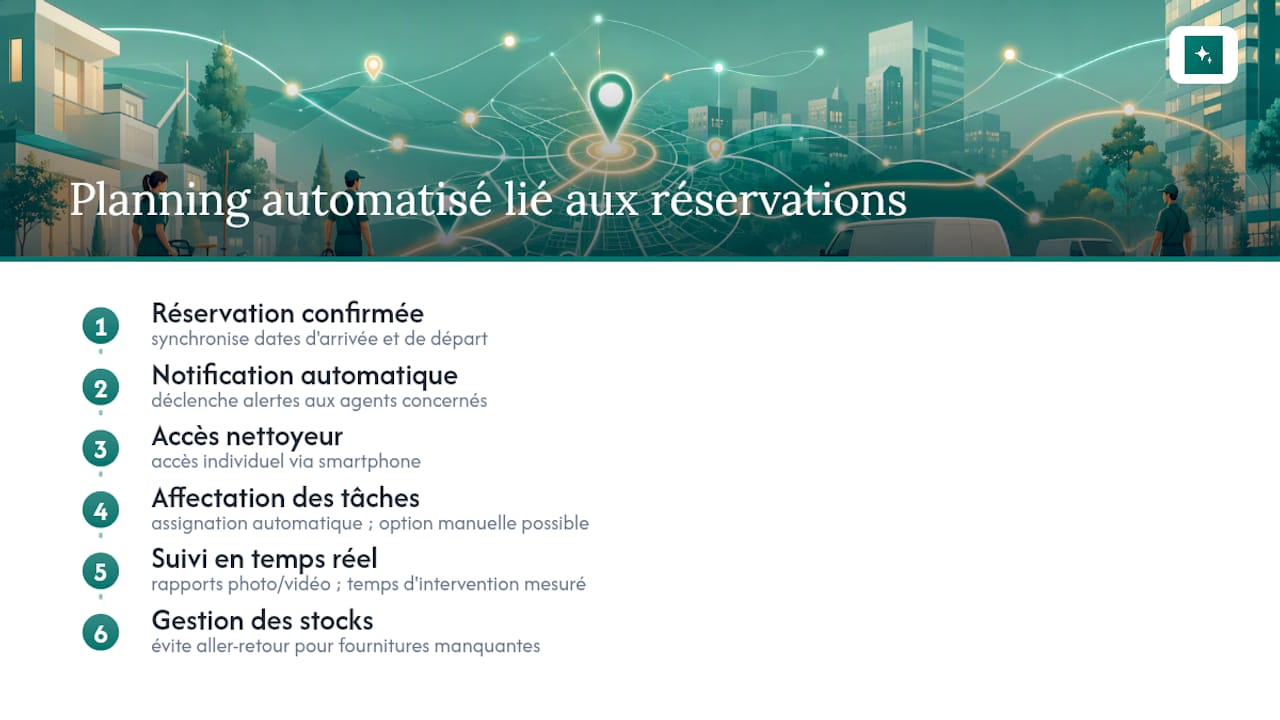
In practice, the app syncs guest checkout and check-in dates, sends automatic notifications to the relevant cleaners, and gives each team member individual access via their smartphone. A manager handling fifteen properties across three neighbourhoods no longer needs to call each cleaner to confirm a slot. The system sends the assignment the moment a booking is confirmed on the platform.
Take a team managing a cluster of properties in the same neighbourhood with daily turnovers. CleanClac can automatically assign tasks based on each cleaner's availability, while still allowing manual assignment when the manager wants to stay in control of a specific situation.
Real-time tracking, backed by photo and video reports, does more than reassure the property owner. It gives the manager the raw data to measure actual time on site per job objectively. Without that data, the figure is usually a rough estimate.
The built-in stock and supplies management completes the picture. It prevents a cleaner from arriving on site to find there is no clean linen or that products have run out, which would trigger an unplanned return trip and break the entire day's sequencing. The platform also compares its features with other market solutions in a detailed comparison, useful if you are evaluating several options before choosing.
Operational perspective: what really matters in the first thirty days
Managers who succeed with route optimisation often make the same mistake at the start: they try to automate everything at once, clustering, software, training and KPIs, before checking that their base data, addresses, time windows, skills, is actually reliable. Even the best software cannot fix a wrongly entered address or a misconfigured time slot.
Prioritise three actions in the first month: clean your property data, test the clustering with one pilot team, and train gradually rather than imposing a sudden change. Communication matters as much as method. A cleaner who receives a new schedule with no explanation sees it as one more constraint. A cleaner who understands the reason, fewer kilometres, shorter days, often becomes the best advocate for adoption among their colleagues.
To sustain the gains over time, a fifteen-minute weekly review is enough, provided you always look at the same metrics: kilometres driven, jobs completed, planning time. A complex dashboard nobody opens is worth less than a simple one checked every Monday morning.
Testing a solution built for short-term rental cleaners
Optimising routes manually works up to a point. That point is usually when the number of properties exceeds what a spreadsheet or a WhatsApp group can absorb when last-minute changes come in. CleanClac was designed specifically for that tipping point: automatically syncing cleaning schedules with Airbnb, Booking.com or Abritel reservations, so the manager never has to re-enter time slots by hand.

A pilot test is simple to start: create an account, import your properties and connect your PMS or booking platforms, then invite your cleaners to install the mobile app so they receive their assignments directly. The immediate benefits to look for during a trial come down to three concrete things: weekly planning time (usually the first workload to drop), the reliability of automatic notifications sent to cleaners, and the quality of photo reporting for each job.
Before starting a demo, prepare a list of your active properties, the number of teams involved and the booking platforms you use. You can start directly from the CleanClac product page, or review the comparison with other solutions first if you prefer to evaluate several options before deciding. For managers who also coordinate guest arrivals, this guide on automating guest check-in adds useful perspective on the full property journey.
Sources
- Pixie
Frequently asked questions
How do you optimise cleaning routes effectively?
Group properties by geographic zone based on actual road networks, respect the time windows your clients require, then automate the sequencing with software that recalculates the route in real time based on traffic.
What is the best free route planner for cleaners?
There is no universally recommended free tool for this level of complexity. Free solutions rarely handle dynamic time windows, per-cleaner skill sets and real-time traffic together, yet all three are essential once your fleet exceeds three or four teams.
How do you optimise a journey across multiple cleaning properties?
Start by mapping every property, identify the binding time windows, then order the stops to minimise backtracking rather than following the chronological order in which jobs were received.
Can software like CleanClac manage several booking platforms at once?
Yes. CleanClac syncs cleaning schedules with reservations from Airbnb, Booking.com, Abritel and Vrbo, so your cleaning team never has to re-enter time slots manually.
Is travel time between jobs paid?
This depends on the employment law applicable in your country and the relevant collective agreement. Some agreements distinguish travel time from actual working time while providing a mileage allowance, whereas case law may reclassify that time as working time if the employee has no freedom of use between assignments. This information is general and does not replace advice from an employment law professional with expertise in your jurisdiction.


