Automatic Cleaning Task Assignment for Short-Term Rentals
Learn how automatic cleaning task assignment works, when to activate it, and how to deploy it across your short-term rental portfolio in under four weeks.

Jonathan Lalinec

Yes, automatic cleaning task assignment for short-term rentals is achievable, reliable and cost-effective, provided three conditions are in place: an active integration with booking platforms (Airbnb, Booking.com, Vrbo), a structured cleaner database, and a modelled set of assignment rules. Without these foundations, automation simply accelerates existing disorder.
The expected gains are concrete:
- Less coordination time: no more looping WhatsApp threads to confirm who is cleaning what and when.
- Better turnover window performance: tasks are triggered as soon as checkout is confirmed, with no human delay.
- Full traceability: timestamped photos, checklists and status updates replace verbal confirmations.
- Scalability without extra hires: manage several dozen properties with the same operational rigour as a smaller portfolio.
Cleanclac automates this entire chain from booking to proof of service, with native integrations to the main platforms and individual mobile access for each cleaner.
Key takeaways
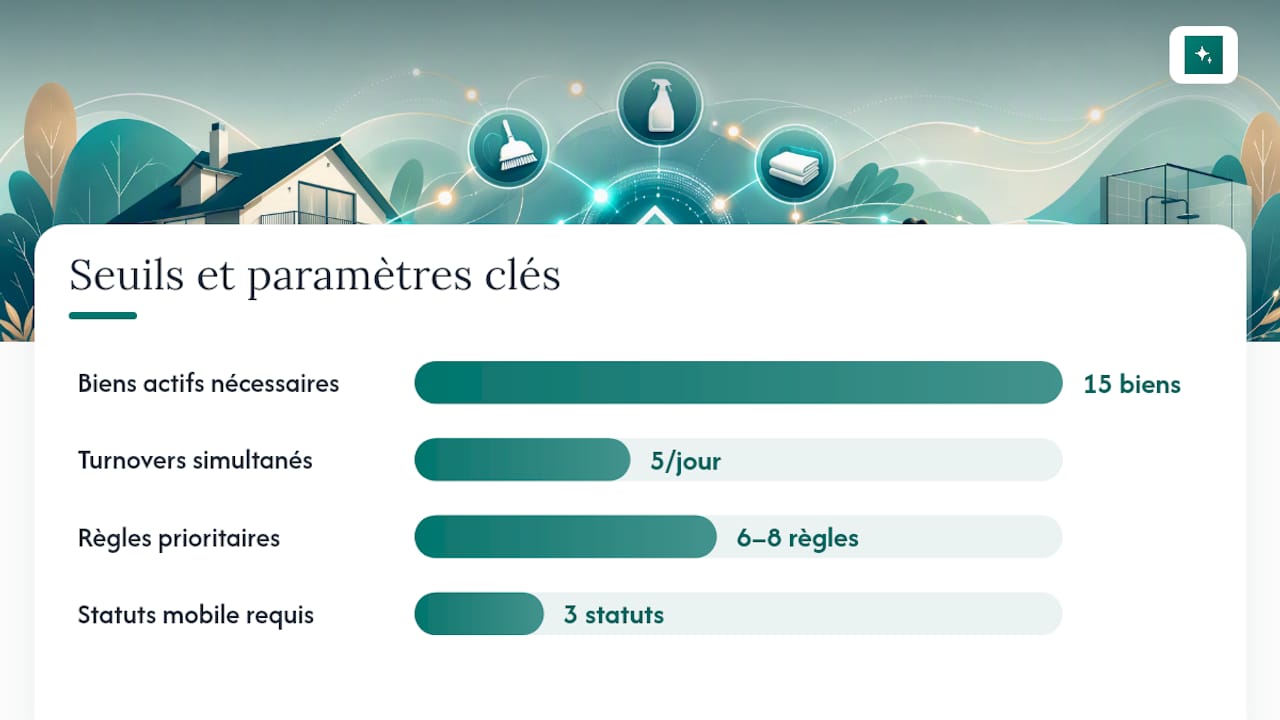
Automating cleaning task assignment becomes worthwhile from 15 active properties, as long as you connect the right data sources and model clear assignment rules before going live.
| Point | Details |
|---|---|
| Activation threshold | Relevant from 15 active properties or 5 simultaneous turnovers per day. |
| Priority rules | Model 6 to 8 critical rules (availability, zone, buffer, same-day priority) before adding edge cases. |
| Essential integrations | Connect Airbnb, Booking.com, Vrbo and your active PMS for reliable triggers. |
| Cleaner mobile flow | Three mandatory statuses (on the way, started, finished + photo) for full traceability. |
| Cleanclac | Automates scheduling from booking to proof of service, with individual mobile access per cleaner. |
Contents
- Why automate cleaning task assignment?
- When should you activate automatic assignment?
- What rules do you need to model for reliable assignment?
- Step-by-step checklist for deploying automatic assignment
- Which integrations are essential?
- What the cleaner needs to see and do on mobile
- Handling exceptions and manual overrides
- Costs and 12-month ROI estimate
- Security and data privacy
- Common pitfalls to avoid during implementation
- What automation really changes day to day
- Cleanclac: automatic assignment in production
- Useful links and resources
- Sources
- Frequently asked questions
Why automate cleaning task assignment?
The strongest argument is not the time saved in itself. It is the elimination of human error risk on the most constrained turnovers. A failed same-day flip costs one night's revenue, a bad review and potentially a platform penalty.
Centralised tools reduce coordination time between cleaners and operators, and ease the friction caused by multiplying communication threads. In practice, this means:
- Fewer inbound calls: each cleaner receives their schedule on mobile without having to ask for confirmation.
- Automatic proof of service: timestamped photos and checklists create a service record that can be consulted at any time.
- Stabilised occupancy rate: check-in delays decrease, and reviews improve as a direct result.
Beyond around ten properties, manual scheduling becomes a full-time job. Automation turns that job into supervision.
When should you activate automatic assignment?
Three thresholds signal that manual assignment is costing more than it saves:
- More than 15 active properties: manual coordination exceeds one to two hours per day.
- More than 5 simultaneous turnovers: scheduling conflicts become impossible to manage manually without errors.
- Recurring same-day flips: every triggering delay has a direct knock-on effect on the next check-in.
Experienced operators identify same-day flips first thing each morning and allocate their most reliable teams to those slots. Automation replicates this logic without human intervention.
Signs that manual assignment is costing too much: repeated delays at the same properties, cleaners calling to confirm their schedule, wrong addresses or access codes, no way to know in real time whether a property is ready.
Pro tip: Run a pilot on 10 to 15 properties for two weeks, targeting high-volume days (Friday and Saturday). Measure the trigger rate within 15 minutes of confirmed checkout.
What rules do you need to model for reliable assignment?
The assignment algorithm is only as good as the rules you give it. Starting with 6 to 8 critical rules is more effective than trying to cover every scenario from day one.
Conditional rules to model first:
- Late checkout detected: dynamic reassignment to the next available slot, manager alert.
- Incident reported (damage, missing supplies): automatic escalation to the operations manager.
- Cleaner unavailable: switch to the backup cleaner in the same geographic cluster.
- Same-day flip: Tier 1 priority, senior cleaner assigned first.
Geographic clustering significantly reduces travel time and protects turnover windows, especially for operators managing a large number of simultaneous rotations.
Edge cases (access denied, last-minute cancellation) are added in later iterations, not at the start.
Step-by-step checklist for deploying automatic assignment
Phase 1: audit and standardisation (days 1–5)
- List all properties with exact address, estimated cleaning duration and service type.
- Standardise checklists by property type (studio, one-bedroom, villa). Automating schedule delivery eliminates the "human router" role and makes scaling easier.
- Record each cleaner: zones covered, availability, skills (standard turnover, deep clean, stock management).
Phase 2: connection and configuration (days 6–12)
- Connect booking sources: Airbnb, Booking.com, Vrbo and any active PMS.
- Configure assignment rules (see table above) in your chosen tool.
- Set up mobile notifications: automatic trigger on checkout confirmation.
Phase 3: pilot and measurement (days 13–26)
- Launch on a geographic cluster of 10 to 15 properties.
- Measure daily: trigger delay, completion rate within the window, number of manual overrides.
- Test manual override on 3 to 5 real scenarios (late checkout, cleaner no-show).
Recommended A/B test: over two weeks, compare a group of properties on automatic assignment against an equivalent group on manual assignment. Measure delays, inbound calls and completion rate within the window. Differences are usually visible within the first week.
- Communicate the change to cleaners before the launch, not on the day.
- Identify a backup cleaner for each geographic cluster before going live.
- Keep a 14-day observation window before switching off manual assignment entirely.
Which integrations are essential?
Automation cannot work without reliable input data. Here are the connections to establish first:
- Airbnb, Booking.com, Vrbo: checkout and check-in times, booking status, guest notes.
- PMS / calendars: availability sync and last-minute modifications.
- Smart lock systems: temporary access codes sent automatically to the assigned cleaner.
- SMS / email gateways: trigger notifications, reminders and exception alerts.
| Source | Data provided | Action triggered |
|---|---|---|
| Airbnb / Booking.com / Vrbo | Checkout confirmed | Automatic task creation and assignment |
| PMS | Booking modification | Task reassignment or cancellation |
| Smart lock | Access code generated | Code sent to the assigned cleaner |
| Cleaner (mobile) | "Finished + photo" status | Availability notification to the manager |
For a full guide on choosing a cleaning management tool for Airbnb that fits these integrations, API compatibility criteria are the deciding factor.
What the cleaner needs to see and do on mobile
A poorly designed mobile flow cancels out the benefits of automation. The cleaner should find the following on their phone before they even leave home:
- Exact address and directions.
- Time window (earliest start time, deadline).
- Detailed room-by-room checklist.
- Access code or entry instructions.
- Estimated duration and service type.
- Expected reference photos (entrance, bathroom, kitchen).
The three mandatory statuses to confirm in the app: On the way, Started, Finished + photo. Without these milestones, the manager cannot confirm property availability in real time.
Cleanclac provides individual mobile access for each cleaner, with pre-loaded checklists and photos submitted directly to the manager's dashboard.
Handling exceptions and manual overrides
Automation must know when to stop. Five categories of exception require an explicit rule:
- Late checkout: dynamic reassignment, plus manager alert if the delay exceeds the buffer.
- Access denied: immediate ops alert, attempt to contact backup cleaner.
- Major incident (damage, unsanitary conditions): escalation to the manager, automatic task suspended.
- Missing supplies: manager notification, "finished" status blocked.
- Last-minute cancellation: automatic task cancellation, cleaner released.
The escalation principle: automatic detection, attempt at automatic reassignment, then if no resolution within 15 minutes, a human alert with full context. For Tier 3 properties (low constraint, wide window), a simple rule is to use them as a buffer to absorb delays from more constrained rentals.
Costs and 12-month ROI estimate
Cost breakdown
- SaaS subscription: varies by number of active properties (see indicative pricing).
- Initial integration and setup: 4 to 8 operator hours.
- Cleaner training: 1 to 2 hours per person.
Simplified ROI model (12 months, indicative figures)
The basic formula: (hours saved × hourly value + protected revenue) minus annual SaaS cost = net ROI. On a portfolio of 20 properties with 5 turnovers per week, breakeven is typically reached in under three months.
Security and data privacy
A few non-negotiable points to protect access codes, guest data and proof-of-service photos:
- Least-privilege principle: each cleaner sees only their own tasks, not those of others.
- Encrypted access codes: encrypted storage, secure transmission, automatic expiry after the service.
- Access logging: who viewed what and when, available to the manager.
- Limited photo retention: set a retention period (30 to 90 days depending on use) and delete automatically beyond that.
- Role separation: ops, cleaners and support have distinct access levels.
Apply the best practices above universally, and verify specific local obligations (GDPR in Europe, for example) with qualified legal counsel.
Common pitfalls to avoid during implementation
Automation projects fail in almost always the same ways:
- Rules that are too complex from the start: 30 poorly tested rules produce more errors than 8 solid ones.
- Incomplete address or access data: an ambiguous address or a missing code blocks the entire chain.
- No identified backup cleaner: without a fallback, the first unhandled exception becomes a crisis.
- Poor communication to teams: cleaners discover the new system on launch day.
- No audit of the first 30 assignments: configuration errors repeat if no one reviews them.
A reliable partner, an organised checklist and automation tools for communication are the three pillars of a successful cleaning operation. Remove one and the other two are not enough.
Systematically audit the first 30 automatic assignments. Note every manual override and its cause. That list tells you which rules to adjust first.
What automation really changes day to day
Before automation, a busy day looked like this: check checkouts across three platforms, send individual messages to each cleaner, manage confirmations, handle unexpected issues by phone, then try to figure out at the end of the day whether all properties were ready. Two hours minimum, often more.
After automation, that same day comes down to watching a dashboard. Tasks go out automatically as soon as checkout is confirmed. Cleaners receive their schedule on mobile without being called. Exceptions surface automatically with the context needed to decide quickly. This is not a marketing promise. It is what eliminating the human router role actually produces.
What managers often underestimate is the impact on their ability to grow. Managing 40 properties with the same rigour as 15 is not a question of talent. It is a question of systems. Automation is that system.
Cleanclac: automatic assignment in production
Cleanclac connects directly to Airbnb, Booking.com, Vrbo and the main PMS platforms to trigger cleaning tasks as soon as checkout is confirmed, with no manual step required. Each cleaner has individual mobile access with a pre-loaded checklist, access code and time window. End-of-service photos appear in the manager's dashboard in real time.

Onboarding follows four steps: connect the booking platforms, map cleaners by zone, configure assignment rules, then run a two-week pilot before full production. For managers looking to compare the available solutions before deciding, Cleanclac ranks among the most integrated options on the market. Start a free trial on Cleanclac to test automation on your portfolio.
Useful links and resources
- Short-Term Rental Cleaning Staff Shortages (RentalScaleUp): analysis of labour market tensions for STR cleaners and the role of centralised tools.
- How to Manage Back-to-Back Vacation Rental Turnovers (RapidEye): operational guide on prioritising and clustering turnovers.
- Multi-Property Airbnb Cleaning Turnovers (MagicBNB): best practices for standardising checklists and automating scheduling across a multi-property portfolio.
- The Ultimate Short Term Rental Cleaning Guide (The Short Term Shop): complete guide to the three pillars of a successful STR cleaning operation.
- Airbnb cleaning software comparison 2026: selection guide for choosing the right tool for your portfolio.
- Tools and automation guides for short-term rentals: practical articles for going deeper on STR automation workflows.
Sources
- Short-Term Rental Cleaning Staff Shortages: Why 2026 Won't Improve
- How to Manage Back-to-Back Vacation Rental Turnovers | RapidEye
- How to Run Cleaning and Turnovers Across a Multi-Property Airbnb Portfolio | MagicBNB
Frequently asked questions
From how many properties does automation become worthwhile?
Automation generally becomes worthwhile once you reach a moderate number of active properties or simultaneous turnovers, where the time saved outweighs the setup cost.
Do you need a PMS to automate task assignment?
No, a PMS is not required. A direct connection to the Airbnb, Booking.com or Vrbo APIs is enough to trigger tasks automatically. A PMS adds flexibility for multi-platform portfolios.
How do you handle a late checkout with automatic assignment?
The standard rule is to trigger a dynamic reassignment as soon as the checkout exceeds the planned buffer, with an automatic alert to the manager if no replacement slot is available within 15 minutes.
Does Cleanclac work with Airbnb and Booking.com?
Yes. Cleanclac natively integrates Airbnb, Booking.com, Vrbo and the main PMS platforms to trigger cleaning tasks as soon as checkout is confirmed and send access details to the assigned cleaner.
How long does it take to deploy automatic assignment?
With a structured setup, the pilot can start within one to two weeks. Full production, after tuning the rules over the first 30 assignments, typically takes three to four weeks.


