Build a cleaning team in 48 hours: checklist & tools
A practical guide for managers: how to write SOPs, automate job creation, build a backup pool, and track quality KPIs for your short-term rental cleaning team.

Jonathan Lalinec
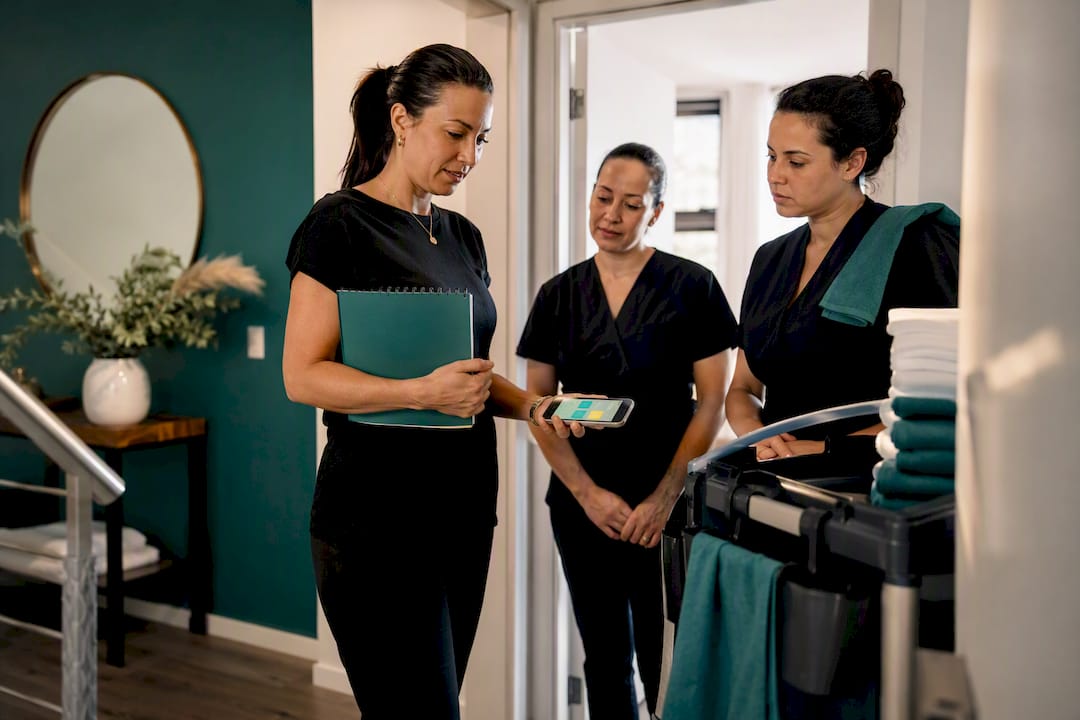
Write your SOPs, automate job creation the moment a booking is confirmed, and build a backup pool before you need one. These three levers prevent the vast majority of scheduling failures. The practical payoff: consistent quality regardless of which cleaner is on site, fewer hours lost chasing missed tasks, and a level of responsiveness that holds even on the busiest checkout weekend. What follows explains how to put each one in place, step by step.
In brief:
- Standardising procedures through written SOPs and a backup pool prevents delays and errors in job scheduling.
- Automating tasks such as job creation and notifications streamlines management as your portfolio grows and guarantees full traceability.
- Building a precise schedule with required fields and linking each job to pay or invoicing cuts admin time and reduces errors.
- Handling absences, cancellations, and peak periods effectively relies on automatic reassignment and standardised communication to limit delays.
- Tracking simple KPIs such as on-time completion rate or photo compliance lets you quickly identify where improvements are needed.
Table of contents
- What should an operational cleaning schedule contain?
- Staffing models and practical assignment rules
- Tools and automation to prioritise for time savings
- Standardising with checklists and SOPs: a quick how-to
- Procedures for handling absences, cancellations, and peak periods
- Quality tracking: which KPIs to follow and how to act on them
- Illustrated operational case study: what a dedicated app changes
- How to train and upskill your cleaning team
- How to structure internal communication across your teams
- How to manage cleaning supplies and equipment
- Hygiene and safety standards your team must follow
- How to handle guest feedback and resolve issues quickly
- Author's perspective: priorities for 48 hours and three months out
- Automating scheduling and quality proof with Cleanclac
- Sources
- Frequently asked questions
What should an operational cleaning schedule contain?
A cleaning schedule is not a simple list of dates. It is a document, physical or digital, that connects teams, properties, and cleanliness standards, and also serves as the foundation for quality-control checklists. Without that structure, you are flying blind the moment your portfolio grows beyond two or three properties.
To be genuinely usable day to day, a schedule must contain specific fields, not vaguely filled-in boxes:
- The property concerned, with its address and access details (code, key safe, door entry).
- The assigned cleaner, with their competency level for that type of property.
- The time slot, including the outgoing guests' checkout time and the next guests' check-in time. This is critical for managing the checkout inspection and recovering the deposit without surprises.
- The estimated job duration, calculated from the floor area and expected level of soiling.
- Job status: pending, in progress, completed, signed off with photos.
Two scheduling logics coexist. For short-term rentals, the schedule is built from bookings: each confirmed booking triggers a cleaning job on the checkout date. For standard cleaning contracts such as offices or retail, the cadence is fixed and recurring, with no direct link to a reservation calendar.
Always connect your schedule to pay or invoicing. If every job records its actual duration and sign-off status, you eliminate the end-of-month back-and-forth trying to piece together who did what, where, and for how long.
Staffing models and practical assignment rules
Three staffing models exist for organising a cleaning team, and the right choice depends mainly on your portfolio size and how much control you want to keep. In short-term rental, professional literature distinguishes the in-house model, the outsourced model, and the hybrid model, each suited to a different portfolio size and level of quality control.
- In-house model: you hire and train your own cleaners. Ideal when your volume is stable and brand quality is your absolute priority, but costly if activity fluctuates heavily.
- Outsourced model: you use contractors or cleaner marketplaces. This handles peak demand well, at the cost of harder quality control.
- Hybrid model: a core of in-house cleaners provides stability, supplemented by outsourced capacity for peaks. This is the setup many managers end up adopting out of pragmatism, combining stability with flexibility.
When dispatching jobs, rely on simple, objective rules rather than gut-feel decisions: how close is the cleaner to the property, what skills does the job require (a high-end property is not the same as a student studio), how much work is already scheduled that day, and what are the cleaner's stated preferences.
Build your backup pool before the first emergency. Recruit two or three additional cleaners who are trained on at least your basic SOPs, with an onboarding that takes no more than half a day: access to the schedule, a standard checklist, and one point of contact for questions on site.
Tools and automation to prioritise for time savings
A shared spreadsheet works when you manage one or two properties. Beyond that, manual coordination can no longer carry the load. That is why dedicated tool adoption grows strongly with portfolio size. Three categories compete: the shared spreadsheet, generic scheduling software, and platforms integrated directly with booking systems (PMS).
Prioritise these automations, in order of impact:
- Automatic job creation the moment a booking is confirmed, with no manual data entry.
- Instant mobile notification to the assigned cleaner, with full property access details.
- Automatic job reassignment when a booking is cancelled, to avoid wasted trips or duplicate jobs.
- Centralised reporting with timestamped photos at the close of each job.
On the technical side, insist on at minimum: a mobile interface designed for cleaners in the field (not a patched web version), multi-property management if you cover several areas, an integration or API with the main PMS platforms, and a reporting dashboard that requires no specialist training to use.
Pro tip: Always test a new tool with your least tech-savvy cleaner, not your most digital-native one. If they can find their way around in five minutes, the tool will hold up in peak season.
For a deeper look at selection criteria, our Airbnb cleaning software comparison sets out the differences between generic solutions and specialist tools.
Standardising with checklists and SOPs: a quick how-to
A written standard operating procedure (SOP) for each room turns a variable clean into a repeatable result. Documenting tasks room by room and embedding reference photos delivers consistent quality regardless of which cleaner is assigned, and cuts onboarding time significantly for new starters.
Structure each SOP as follows:
- Task list in logical room order (most dirty to least dirty, top to bottom).
- Estimated time per task, so you can spot abnormal variances quickly.
- A reference photo of the expected result, displayed directly in the app or in the on-site binder.
- Restocking levels for consumables (linen, products, paper).
Standardisation reduces dependence on individual skill, a principle confirmed by field experience in managing cleaning teams. In practice, it means a cleaner who has been on the job three days can produce results close to those of a veteran, provided the checklist is precise enough.
Close the loop with a regular audit: check a sample of jobs each week, compare the photos submitted against the reference photo, and update the SOP itself if a recurring gap appears. Our guide on checklists and quality includes ready-to-adapt templates.
Procedures for handling absences, cancellations, and peak periods
A cleaner calling in sick or a last-minute cancellation should never bring the schedule to a halt. Operational setups that hold under pressure automate job creation, map properties to available cleaners, and automatically reassign the affected job when a cancellation comes in.
- Immediate detection: as soon as an absence or cancellation is reported, the tool or manager identifies the affected job.
- Reassignment to the backup pool: the job goes first to available cleaners who are geographically close.
- Escalation if no response: after a set delay (15 to 30 minutes), the manager is alerted to step in manually.
- Standardised communication: a short script informs the guest or incoming traveller if there is a delay, with no last-minute improvisation.
During peak periods, temporarily double up on critical jobs (high-visibility properties) rather than risk a no-show.
Quality tracking: which KPIs to follow and how to act on them
Three indicators are enough to manage a cleaning team without drowning your supervisors in dashboards: on-time job completion rate, average turnaround time, and photo compliance rate (jobs closed with complete visual proof).
- Completion rate: jobs finished on time divided by jobs scheduled.
- Average turnaround: actual time recorded versus the SOP estimate.
- Incident rate: number of complaints or re-cleans over total jobs completed.
- Photo compliance: percentage of jobs closed with complete photo documentation.
Pro tip: Set a realistic target before judging your numbers.
Automate alerts whenever a KPI moves outside its normal range, and close the loop with a short feedback session with the cleaner concerned, followed if necessary by a refresher on the relevant SOP.
Illustrated operational case study: what a dedicated app changes
In practice, a mobile app like Cleanclac brings together three building blocks that most managers handle separately:
- Automatic job creation the moment an Airbnb, Booking.com, or Vrbo booking is confirmed, with an instant notification to the cleaner.
- Individual smartphone access for each cleaner, with no manual coordination by phone or message needed.
- Mandatory photo proof at the close of each job, archived in a report accessible in real time.
The expected benefit: fewer repetitive manual tasks for the manager, and complete traceability if a dispute arises with a guest or property owner.
How to train and upskill your cleaning team
Training does not stop after day-one onboarding. A cleaner develops through stages, and your upskilling plan should reflect that progression rather than trying to teach everything at once.
The first stage covers the basics: reading the schedule, following the core SOPs, and using the app or reporting tool. Allow half a day to a full day, with hands-on mentoring from an experienced cleaner rather than just written support.
The second stage addresses complex situations: high-end properties with specific requirements, incident handling (damage, forgotten items), and direct communication with the client when a problem is spotted on site. Reserve this stage for cleaners who have already proven themselves on standard jobs.
The third stage, often underused, turns a senior cleaner into a trainer. Having your best people mentor new starters speeds up collective onboarding and rewards experienced cleaners, which reduces turnover in a sector where it remains high.
Formalise each stage with a sign-off checklist: a cleaner only moves to the next level once their recent jobs meet the set compliance threshold (photo, timing, no incidents). This prevents promoting someone too soon and eroding the quality guests perceive.
How to structure internal communication across your teams
Coordination between cleaners in the field, area supervisors, and guest services most often breaks down for one simple reason: too many parallel channels. Text messages, calls, group chats, and spreadsheets all coexist, and information gets lost between them.
Centralise operational communication in a single tool, ideally the one that already carries the schedule and jobs. Each cleaner should be able to check their day's instructions, flag a problem, and confirm a job close in the same place, without switching apps.
Keep three levels of communication separate and never mix them:
- Job instructions: access details, specific notes, owner requirements, sent before the job starts.
- Field reports: incidents spotted, missing supplies, delays, flagged during or immediately after the job.
- Cross-area coordination: sharing an available cleaner between two geographic zones when a short-term need arises.
For teams covering several areas or cities, designate an area supervisor who acts as the link between the field and management. Without that relay, every decision escalates to the main manager, who quickly becomes the bottleneck for the whole operation.
How to manage cleaning supplies and equipment
A cleaner who arrives on site without the right product or without clean linen wastes precious time, often at the expense of the next job's quality. Supply management deserves the same rigour as job scheduling.
Structure stock tracking across three levels: the central depot or storage room, the cleaner's vehicle or trolley, and the on-site consumable stock (linen, paper, welcome products for short-term rentals). Each level has its own restocking threshold, and the movement between levels should be visible without a weekly manual inventory.
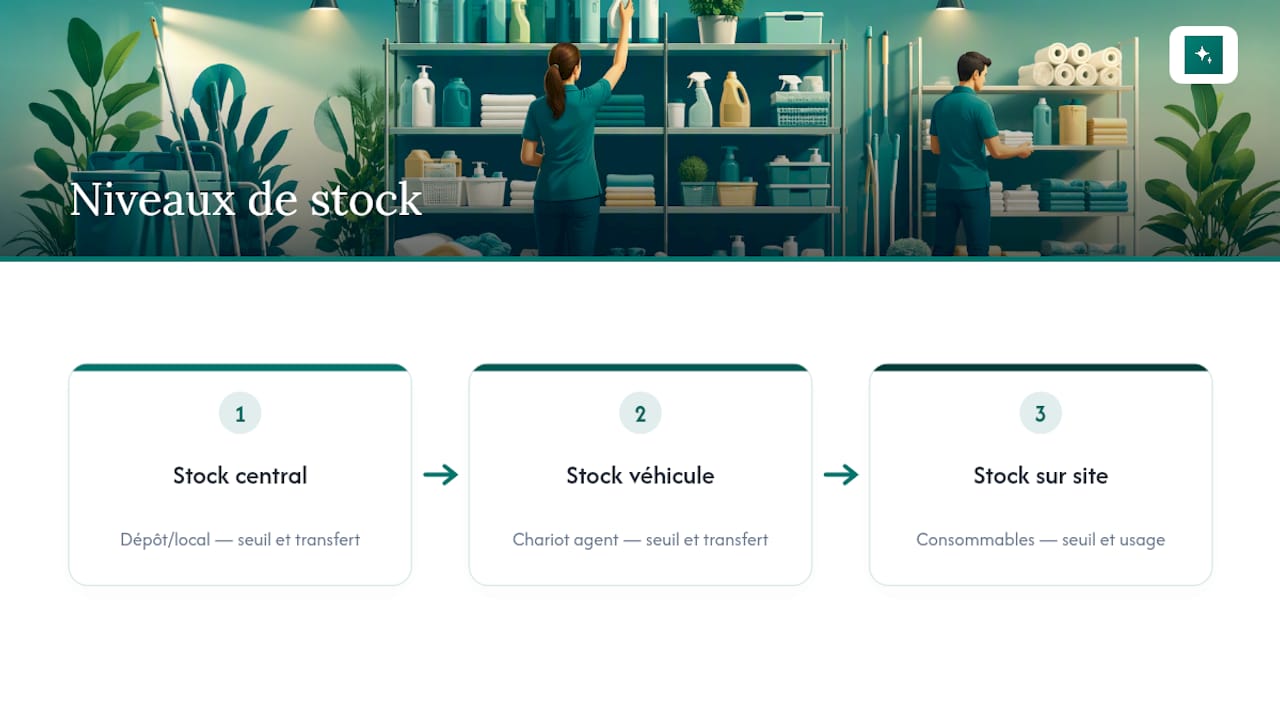
This approach to supply organisation is in fact among the practical levers recommended to streamline turnovers, alongside schedule digitalisation and KPI tracking.
Track consumption by property and by cleaner rather than as a single total. An abnormal consumption spike at a specific property often signals a problem before it shows up in guest reviews: wrong product dosage, waste, or petty theft of small equipment.
Hygiene and safety standards your team must follow
Workplace safety in professional cleaning rests on simple rules that are too often overlooked because they have never been formalised. Two categories of risk directly affect your cleaners: exposure to chemical products and repetitive-strain injuries.
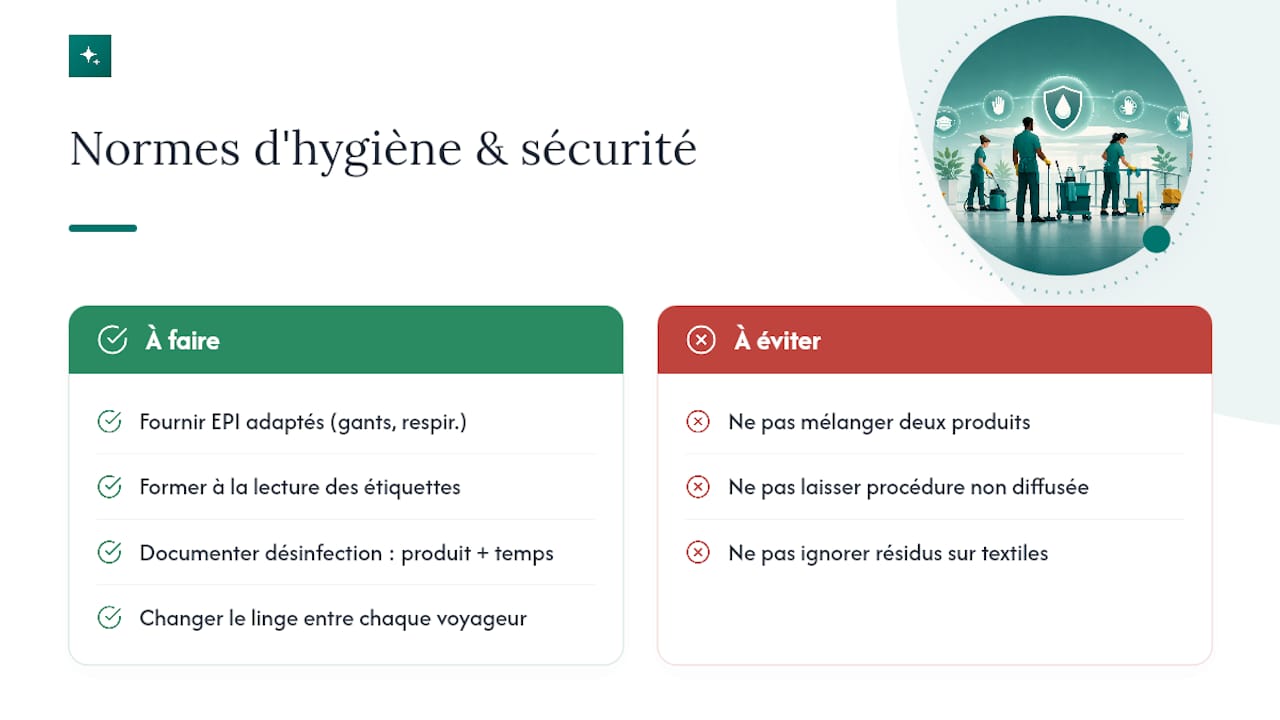
Always provide the appropriate personal protective equipment (gloves, and respiratory protection for certain products where required), and train every cleaner to read safety labels before starting any new task. Never mix two products without knowing their chemical compatibility: this basic rule prevents the most serious incidents in the sector.
On hygiene, the frequency of disinfecting touch points (handles, light switches, remote controls) must appear explicitly in your SOP, specifying the product and the required contact time. For short-term rentals, changing linen between every guest and checking textiles for residues (hair, stains) is never optional, regardless of how tight the schedule is.
Finally, formalise an incident procedure: what to do if a cleaner is injured, if a product is used incorrectly, or if a property presents an unexpected hazard such as faulty electrical wiring. A single page with the relevant contact numbers is enough, provided every cleaner actually knows it exists and is not just filed away in an admin folder.
How to handle guest feedback and resolve issues quickly
A problem reported by a client or guest, whether a property left dirty or a missed appointment, is resolved far better when it is addressed quickly and according to a procedure known in advance. Improvising is costly in reputational terms, especially in short-term rental where a negative review stays visible for a long time.
Set a maximum response time (ideally under 30 minutes during the day) for any complaint, with a designated person who can make a quick call: send a cleaner back to the property, offer a goodwill gesture, or simply document the incident if the complaint is not justified.
Photo proof and audited checklists significantly reduce disputes by providing an immediate factual basis. If the job was closed with photos that match the SOP reference, you have concrete evidence to respond to the complaint without relying on the cleaner's word against the guest's.
Log every incident in a simple register, even a brief one: date, property, cleaner, nature of the problem, resolution applied. After three similar reports on the same property or the same cleaner, stop treating each one as an isolated event. Revise the relevant SOP or run a refresher session with the cleaner concerned.
Author's perspective: priorities for 48 hours and three months out
In the next 48 hours, write one complete SOP, set up your backup pool, and review your critical time slots. Over three months, automate recurring jobs, train in stages, and start measuring your KPIs without waiting for the first crisis to prompt you.
, Jonathan
Automating scheduling and quality proof with Cleanclac
Once your SOPs are written and your backup pool is in place, the next step is removing the manual load that remains: re-entering bookings, chasing cleaners by message, requesting close-out photos one by one. That is exactly what Cleanclac automates for short-term rental managers.

The app creates the job automatically the moment an Airbnb, Booking.com, or Vrbo booking is confirmed, notifies the cleaner on their smartphone with access instructions, and centralises photo reports at every job close. Each cleaner has their own mobile access and can check their schedule without going through you. Stock tracking and per-cleaner performance monitoring happen from a single dashboard, eliminating the weekly manual inventory mentioned earlier.
Discover the Airbnb and Booking.com cleaning management app and see how it fits into your current operation, whatever the size of your portfolio.
Sources
- Planning an équipe de nettoyage: our advice
- Managing a cleaning team
- Managing multiple cleaning teams across 10+ properties
Frequently asked questions
What is the best way to organise a cleaning operation?
The best approach combines a clear schedule by time slot and by cleaner, written room-by-room SOPs, and a backup pool ready to step in when someone cancels or calls in sick.
What are the essential rules of professional cleaning?
Three rules dominate: clean from the least dirty area to the most dirty to avoid cross-contamination, work from top to bottom so dust falls onto surfaces not yet cleaned, and always let surfaces dry before disinfecting.
In what order should you clean a room or a property?
Start by decluttering and airing out the space, then dust high surfaces, clean surfaces and floors, and finish with disinfecting touch points and a final photo check.
What is the first thing to clean when you arrive at a property?
As a rule, start with the dirtiest or most heavily used room, usually the kitchen or bathroom, before moving on to living areas and bedrooms.
How does a tool like Cleanclac help organise a cleaning team?
Cleanclac automatically creates a job the moment a booking is confirmed, notifies the cleaner on their phone, and centralises photo proof, reducing the manual coordination described in the sections above.


